
Contracting Information A - B
AGA Forms
- EFT Changes
- AOC Set Up & Termination
- Hierarchy Changes
- Contracting Status Meanings
- Errors and Omissions
Aetna
- Contracting
- Transfer / Release Policy
- Demographic Changes
- EFT Changes
- Add Non Resident State
- Assignment of Commissions
Aetna ACA
- Contracting
- Transfer / Release Policy
- Demographic Changes
- EFT Changes
- Add Non Resident State
- Assignment of Commissions
Aetna Med Supp
Aflac
AIMC – ACE
AIMC – MIAC
AIMC – WoodmenLife
Alignment
Allstate Health
Ambetter ACA
American Benefits Life – Liberty Bankers
AmeriHealth – IBC
AmeriHealth Caritas
AmeriHealth Caritas ACA
Ameritas Dental and Vision
Anthem Blue Cross and Amerigroup
- Contracting
- Transfer / Release Policy
- Demographic Changes
- EFT Changes
- Add Non Resident State
- Assignment of Commission
Anthem ACA
Aspire
Assurity Life Insurance
- Contracting
- Transfer / Release Policy
- Demographic Changes
- EFT Changes
- Add Non Resident State
- Assignment of Commissions
Astiva
AvMed
Bankers Fidelity
- Contracting
- Transfer / Release Policy
- Demographic Changes
- EFT Changes
- Add Non Resident State
- Assignment of Commissions
Banner Health
BCBS AR
BCBS of AZ
BCBS HCSC – IL, MT, NM, OK, & TX
- Contracting
- Transfer / Release Policy
- Demographic Changes
- EFT Changes
- Add Non Resident State
- Assignment of Commission
BCBS of Kansas City (MO & KS)
BCBS of MI
BCBS of MN
BCBS of NC
BCBS of NE
BCBS of SC
BCBS of TN
Blue Shield
Aetna
Thank you for your interest in marketing Aetna Medicare and SilverScript through Applied General Agency. Aetna uses an online contracting system and we will need some information to get the process started.
To get started log into your AGA portal and obtain a 5.6 Carrier Request Form and send it to contracting@appliedga.com. You will find this form in your AGA portal under Sales Tools, My Sales Tools, Forms Library, then “5.6 Contracting Forms”. After you return the 5.6 Add Carrier Request you will receive an invitation with a link to begin contracting in a few days. Click on the link to begin contracting.
For a full overview please see Aetna Onboarding Guide

You will receive an invitation email from AetnaMedicare@aetna.com. The subject line will read, “You have been invited to contract with Aetna Medicare!”
You will then be asked if you already have access to the Aetna Producer World. If you do not, you will be asked to register. After you are registered for Producer World, click back on the contracting link and log in using your Username and Password.
If you, cannot find your invitation email or are taken to the Producer World home page https://www.aetna.com/producer/login, navigate to Individual Medicare, Quick Links then Medicare Producer Contracting. Next, you will be guided to Medicare Producer Contracting where you will be prompted to complete your contract. Go to Open Cases and complete the contract. You will receive an on-screen confirmation of submission.
If you have multiple invites, you will need to cancel all but one invite to move forward.
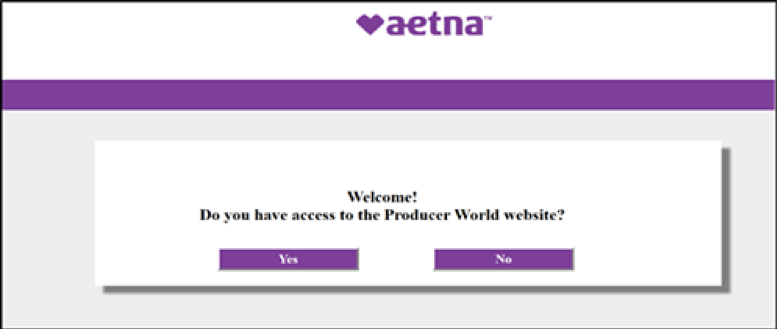
Upon login to Producer World, your records will be pulled from the National Insurance Producer Registry. Be sure to update your personal and firm information with the National Insurance Producer Registry https://nipr.com/licensing-center/change-contact-info.
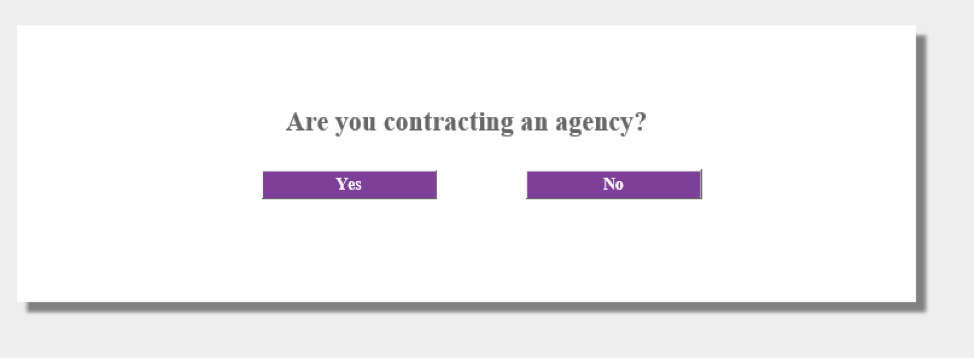
Aetna will then ask if you are contracting as an agency. Select YES if you are the principal of your own corporation. Select NO if you are not the principal of your own corporation.
You will then review and sign your W-9. Complete required fields with and select the blue “Click to Sign” button.

Continue and select invitation.

Now you will work your way through each contracting tab. Fill in all the mandatory fields as requested. The tab will show “incomplete” if information is missing. Note the final “Transfer” tab – this is where you will upload your Aetna transfer form if you are moving from a different upline agency. This is NOT required if you are contracting with Aetna for the first time.
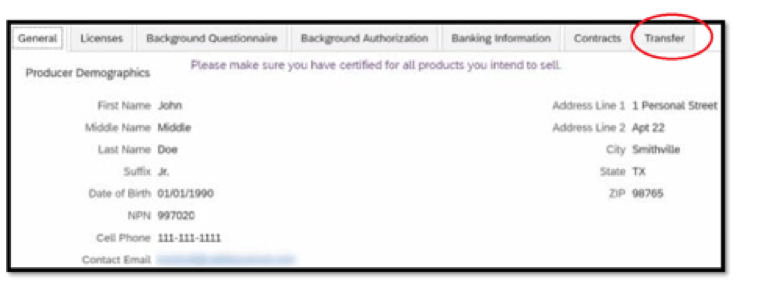
If you are already contracted you will need to complete the Aetna Transfer Release form. If your current upline signs it, you will transfer immediately. If the form is not signed by your upline, upload the form with just your signature and you will be realigned after a 90-day waiting period. No transfers can be made between 10/1 and 12/31.
After all tabs have been completed, submit the contract for processing. You will receive a confirmation of submission. You can immediately begin Aetna certification.
IMPORTANT – Your contract will NOT be processed until certification is complete.
Upon completion of your contract and yearly certification, you will be appointed by Aetna for Individual Medicare products in the pre-appointing states where they hold an active license. Just-in-time appointing states will be ordered after a policy is written.
Transfers are not permitted or processed from October 1 – December 31. The last day to submit a notice of intent for the current year’s AEP is June 30th.
If you are currently contracted, have been with your current upline for at least three months AND have no production in the last three months you may submit a new contract. Please follow the instructions above for new contracting.
If you are contracted less than three months or have had production in the last three months, you will need to complete a new contract and upload the Aetna Transfer Release form. Please follow the instructions above for new contracting.
If your upline will not sign the Transfer form, begin a notice of intent by completing all the way to the agent portion of the Transfer form. The completed transfer must be submitted electronically via Medicare Producer Contracting via Producer World. Open Producer World>Medicare Producer Contracting>Open assigned invitation>Add Document>Upload transfer or intent to transfer. Once submitted, you will be transferred to the AGA after a 3-month interim period.
No action is required if your records are updated with the National Insurance Producer Registry (NIPR). Your updated demographics from NIPR will flow into the Aetna portal.
Update your personal and firm information with the National Insurance Producer Registry https://nipr.com/licensing-center/change-contact-info.
Log into Producer World https://www.aetna.com/about-us/login.html. Navigate to Manage your personal information > Personal/Firm profile > Firm Access Info/privileges > Personal Profile
If you have questions, just contact the Aetna Medicare Broker Services Department at 1-866-714-9301 or brokersupport@aetna.com. Normal business hours are 8 a.m. to 8 p.m. ET from Monday – Friday.
Log into Producer World https://www.aetna.com/about-us/login.html. Navigate to the Compensation section. Click “Get compensation statement” then select the applicable direct deposit link (individual or firm). Submit the updated form online.
If you have questions, just contact the Aetna Medicare Broker Services Department at 1-866-714-9301 or brokersupport@aetna.com. Normal business hours are 8 a.m. to 8 p.m. ET from Monday – Friday.
NOTE: Changes are not limited to Individual Medicare but apply to all lines of Aetna business. Requests will be processed within two pay cycles. You may receive a paper check in the meantime
You should actively monitor your RTS status before selling in each state where you conduct business. You can begin to monitor your active RTS status now on our new map tool on Aetna’s Individual Medicare Page under Requirements to sell on Producer World, https://www.aetna.com/about-us/login.html. This interactive map will allow an agent or agency principal to determine their own RTS status by product and by state, specific to the selling season.
To add a state email brokersupport@aetna.com, and include your name, NPN, non resident license, and state you would like to be contracted in that state.
Some state appointments are processed just in time, and others need an appointment prior to submitting business. Review Aetna’s Pre-Appointment State List
Aetna ACA
As of 01/01/2026 Aetna is pulling out of the ACA market. New agent contracting will not be processed
Thank you for your interest in contracting with Aetna ACA . AGA is partnered with our Integrity Partner, Plan Advisors, for us to offer this carrier to our agents. To get started log into your AGA portal and obtain a 5.6 Carrier Request Form and send it to contracting@appliedga.com. You will find this form in your AGA portal under Sales Tools, My Sales Tools, Forms Library, then “5.6 Contracting Forms”.
After a few days, you will be sent a contracting link to complete your ACA contracting.
Adding Aetna ACA Existing Broker or Aetna ACA New Broker and choose Plan Advisors as your upline.
Thank you for your interest in contracting with Aetna ACA . AGA is partnered with our Integrity Partner, Agent Pipeline, for us to offer this carrier to our agents. To get started log into your AGA portal and obtain a 5.6 Carrier Request Form and send it to contracting@appliedga.com. You will find this form in your AGA portal under Sales Tools, My Sales Tools, Forms Library, then “5.6 Contracting Forms”.
After a few days, you will be sent a contracting link to complete your ACA contracting.
Adding Aetna ACA Existing Broker or Aetna ACA New Broker and choose Plan Advisors as your upline.
Update your personal and firm information with the National Insurance Producer Registry https://nipr.com/licensing-center/change-contact-info. Your demographics from NIPR will flow into Aetna’s contracting tool.
Log into Producer World https://www.aetna.com/about-us/login.html. Navigate to Manage your personal information > Personal/Firm profile > Firm Access Info/privileges > Personal Profile
If you have questions, just contact the Aetna Medicare Broker Services Department at 1-866-714-9301 or brokersupport@aetna.com. Normal business hours are 8 a.m. to 8 p.m. ET from Monday – Friday.
Log into Producer World https://www.aetna.com/about-us/login.html. Click on ‘Compensation Services‘ which is located on the left side of the screen then click on ‘EFT & forms’.
If you have questions, just contact the Aetna Medicare Broker Services Department at 1-866-714-9301 or brokersupport@aetna.com. Normal business hours are 8 a.m. to 8 p.m. ET from Monday – Friday.
To do an add state email Aetna at Laau@aetna.com with a license copy and your NPN in subject line.
Commission can be assigned to agent/agency of your choosing.
Aetna Med Supp
Thank you for your interest in marketing Aetna Med Supp through Applied General Agency. Begin your Aetna Med Supp contracting today via DocuSign Aetna Med Supp Contracting
To begin a transfer for Aetna Med Supp you will need to complete the Aetna Med Supp Contracting and submit the form via DocuSign.
A letter of release is needed if you have written business within the past 6 months or have been contracted with your current upline for less than 6 months.
If you are unable to obtain a release, you may begin a delayed 6 month release.
To change your EFT, complete the EFT form. Either fax 855-571-3847 or electronically send to Aetna Med Supp. To electronically submit log into https://www.aetnaseniorproducts.com/ssi/index.html, select My Tools, Agent Maintenance. Request type is Agent Maintenance, Select Agent Number, upload EFT form, and submit.
AGA
To set up, change or cancel your EFT for AGA commissions please complete the EFT Form via DocuSign. The name on check must match the payee name we have on file. If you are changing your payee name please complete the corresponding AOC change forms.
Assignor = the party (individual/entity) that is assigning its commission
Assignee = the party (individual/entity) that is receiving the commission
Please contact contracting@appliedga.com with questions.
If you would like to set up and assign commissions to a corporation you own, please complete the AOC Principal Owned via DocuSign. Be prepared to upload a copy of the corporation license, E&O, and void check. Completing these forms will only change how AGA pays out your agent commissions. AGA will send out contracting links for direct-pay carriers, these need to be completed to allow commissions to be paid to your corporation. Each direct pay carrier has a unique process for updating how commissions are paid.
If you would like to set up and assign commissions to a corporation you do not own, please complete the AOC Non-Principal Owned via Docusign. Assignor will need to enter the contact information for the Assignee. The Assignee must be a signing principal of the corporation, and will need to be prepared to upload a corporation license, E&O and void check. The forms are completed once the Assignor and Assignee complete their portions of the forms. Completing these forms will only change how AGA pays out your agent commissions. AGA will send out contracting links for direct-pay carriers these need to be completed to allow commissions to be paid to the corporation. In instances where the carrier does not allow agent-to-agent AOC or the corporation is not contracted agent commissions can be directed to AGA for distribution.
To terminate an assignment of commission and have your new and past business paid to you, complete the AOC Termination Form. This will require approval from the Assignor and Assignee. Assignor will need to enter the contact information for the Assignee. The Assignee must be a signing principal of the corporation. The forms are completed once the Assignor and Assignee complete their portions of the forms.
To terminate an assignment of commission and have new business paid to you, complete the AOC Termination Form Future Business. Be prepared to upload a copy of a void check. This does not require approval from your previous Assignee to terminate.
Changes within AGA’s hierarchy can be requested by using AGA Hierarchy Transfer Form via DocuSign. This form has a signing order and will need to be completed by all parties before a hierarchy change is made in AGA’s system.
- The releasing principal will click on the link above. The releasing principal will need the agent’s name, the agent’s email on the landing page. On the DocuSign the releasing principal will need to complete the form and list name of the agency the agent is transferring to.
- The form will be sent to the agent to complete and sign
- The form will be approved by AGA Sales, Jason Bronston
- AGA Contracting will then process the hierarchy change
To leave AGA contact help@appliedga.com
| Base Status | In AGA downline / Not in downline | Meaning |
| In Process | Not in downline | AGA will soon send contracting or temporarily waiting for more information |
| Approved | In downline | Agent RTS with carrier for current year |
| Submitted | Not in downline | AGA sent contracting paperwork and waiting for a carrier response |
| Denied | Not in downline | Denied per carrier |
| Closed | Not in downline | Inactivated due to a variety of reasons |
| Missing Document(s) | Not in downline | Paperwork is missing for us to send contracting |
| Out-of-Area | Not in downline | Carrier not available in agent’s state |
| Opted Out | Not in downline | Agent does not want to contract with carrier |
| Pending Business | Not in downline | Contracting can be sent in at the same time as the first piece of business
|
| Pending Documents from Agent | In downline | Need paperwork or information agent in downline |
| Pending Certifications | In downline | Agent needs to complete certifications |
| Pending Carrier Approval | Not in downline | Paperwork submitted waiting for carrier |
| Pending Agent Action – Contract | Not in downline | Agent needs to complete carrier contracting/requirements |
| Pending Agent Action – Certifications | Not in downline | Agent needs to complete certifications |
| Delayed Release – In Process | Not in downline | Carrier offers delayed release. Necessary docs have been submitted to carrier |
| Delayed Release – Pending Agent Action | Not in downline | Carrier offers delayed release. Agent has not completed necessary docs |
| Pending Documents from Agent – Release | Not in downline | Need release from agent to move forward |
Suggested E&O provider https://www.napa-benefits.org/aga/errors-and-omissions
Aflac
Thank you for your interest in marketing Aflac through Applied General Agency. Aflac uses an online contracting system and we will need some information to get the process started.
To get started log into your AGA portal and obtain a 5.6 Carrier Request Form and send it to contracting@appliedga.com. You will find this form in your AGA portal under Sales Tools, My Sales Tools, Forms Library, then “5.6 Contracting Forms”. After you return the 5.6 Add Carrier Request you will receive an invitation with a link to begin contracting in a few days. Click on the link to begin contracting.
The email will be from DoNotReply@aetna.com with “Your application for Aflac” as the subject. Note: A reference number will be generated after you access the link. Please keep this number for your record in order to return to this application if needed.
Contracting:
Click the link in the email
Click the “Start” button or enter your reference number if you are returning to a previously started application.
IMPORTANT – Be sure to save your reference number in case you need to come back to contracting application
Scroll through the screens and complete all the requested information
You will be able to upload any documents that may be needed, such as release letters or explanations for special circumstances
Review your information at the at the “Acknowledgment” page – prior to submission
Click the “Submit” button
Please see Onboarding Guide for a step-by-step guide.
You will receive an email letting you know that your contracting application has been received for processing. Processing will take approximately 7-10 business days. An email will be sent to you with your new Aflac writing number when the approval process is complete.
If you are licensed to sell Final Expense individual whole life insurance plans, you are required to complete an annual anti-money laundering course and provide Aflac proof of completion. Upload your AML training on https://www.suppinsadmin.com/ssitpa/tpaSecure/afl/aflHome.html under My Business then My Profile. AML training can be completed on www.limra.com.
For ancillary products please visit www.aflac.com/tierone
A letter of release is needed if you have written business within the past 6 months or have been contracted with your current upline for less than 6 months.
To transfer immediately a letter of release is needed from your current upline.
If you are unable to obtain a release, you may begin a delayed 6 month release. To begin you will need to contact the Regional Sales Specialist at Aetna to let them know you would like to change hierarchies. You will be able to switch hierarchies 6 months after making this request and can continue to write business during this waiting period.
When the 6 month waiting period is over, you will need to submit a new contract with the requested upline hierarchy.
To review your state appointments with Aflac log onto https://www.suppinsadmin.com/ssitpa/tpaSecure/afl/aflHome.html. Go to My Business, then my Profile to review your state appointments.
In regard to states, all states are JIT except AK, PA, UT, and WY. Those 4 are pre-appointment. If needed, those can be sent to the Tier One at information@aflac.aetna.com and other various licensing questions as well.
Aflac EFT changes can be made on https://www.suppinsadmin.com/ssitpa/tpaSecure/afl/aflHome.html.
AIMC – ACE, Lumos Insurance, MIAC, Woodmen Life
Thank you for your interest in marketing AIMC – ACE, Lumos Insurance, MIAC, Woodmen Life through Applied General Agency. AIMC uses an online contracting system and we will need some information to get the process started.
To get started log into your AGA portal and obtain a 5.6 Carrier Request Form and send it to contracting@appliedga.com. You will find this form in your AGA portal under Sales Tools, My Sales Tools, Forms Library, then “5.6 Contracting Forms”. After you return the 5.6 Add Carrier Request you will receive an invitation with a link to begin contracting in a few days. Click on the link to begin contracting.
Email licensing@aimc.net and indicate what states you want to be contracted with. Include your name, NPN and indicate what carrier(s) the change is for.
All states are pre-appointment – meaning for any state the agent must see it on the ACE E-app portal before writing an application. (Any state is all the states available whether the state has an appointment process or not!)
ACE requires that all individuals hold a valid license in any state they want to conduct business. This includes their resident state although that state may not be available with product at this time. If contracting as an agency, please make all agents aware that ACE requires the agency to hold a valid license in any state they want to conduct business and receive commission of any type. This includes states that may not require an insurance agency license (IA, RI, TN & WI). Please encourage all agents to choose all the states they will be doing business in when completing the online contract. This will speed up the process when they need to write an application as an agent cannot write for ACE if the state has not been activated on their contract/writing#.
Email licensing@aimc.net and indicate what the changes are. Include your name, NPN and indicate the carrier(s) you are making the change for.
Alignment
Thank you for your interest in marketing Alignment through Applied General Agency. Alignment is a self-starter carrier that requires you to complete your certifications and contracting. Please allow about two hours to complete this process. You will be contracting and certifying in one sitting, when complete you should be sent a ready to sell letter. Please have your license, E&O and AHIP ready to upload.
Navigate to https://www.alignmenthealthcare.com/Partners/Brokers; click on Certify+, and select New Agent. Enter your NPN and submit.
Complete General Information. Select Applied General Agency as your contracted affiliation. Just start typing Applied and a drop down will appear for you to select Applied General Agency. Select NEXT.

Upload Documents: Upload your current license, E&O, and AHIP.
AOC Agreement: Fill your full name in Agent Signature and ensure Contracted Agency Name is Applied General Agency.
Training: Please note the following about our certification training and exam.
You need to watch the entire training video before taking the exam. The certification exam must be completed within 2 hours, or you will have to restart the training. All questions must be answered and you have three attempts to pass the exam with an 85% score or greater.
Policy: Active Agents in good standing will be granted a (1) time per year hierarchy change with no release required from FMO/Agency hierarchy. Requests need to be submitted by 15th of the month, to be effective the following month with a blackout period from October – December. Moves requested during the 4th quarter will require a letter of release in order to be honored.
To begin the transfer please complete the Alignment Transfer Form. Be prepared to upload a letter of release If you are submitting the request in October – December.
Contracted Agency = Applied General Agency LLC
Log into Alignment portal, click on your name at the top to bring up your demographics. Click on the Edit button to make changes.
Log into Alignment portal, and complete state specific certifications.
Alignment offers direct pay to agents. Agents will be opted into direct pay or opted out of direct pay based on AGA’s data.
An agent who opted out of direct pay will continue receiving commissions paid by AGA. If an agent is marked as an AOC will not be added to direct pay. To change an AOC agent’s Alignment pay the principal will need to email contracting@appliedga.com and confirm the change that is needed. It is very important to note Alignment’s direct pay will be for new business AND renewals. ALL commissions will be paid to a single location. If a captive agent moved to direct pay, the agent would receive renewals that are not contractually due to them.
An agent who is opted in for direct pay will be sent additional requirements by Alignment, including providing bank account information, submitting a W9 form, and signing Direct Pay Agent Joinder. Failure to complete these steps will result in payments continuing to be directed to AGA, for disbursement. Multiple agents can assign their commissions to a corporation/person. Agents will still be broker of record no matter where they point their commissions. (LOAs are not available, just AOC). Also, direct pay is unique to the agency through which the business was written. Therefore, if an agent moves from AGA to a different agency and opts for direct pay, it will only apply to the business written under the new agency.
Set up Alignment Health EFT by navigating to the My Commission tab in your Alignment Broker Portal, and then click on “Connect to e123” to sign up.
In the e123/Unified TPA Agent Payment portal, follow these steps:
Download, complete, and sign your W-9. Upload it to the Documents section.
- Add your bank account for ACH Direct Payment of Commissions.
- Go to the Documents section on the agent portal, and then click the ‘Generate Agent Joinder’ agreement.
After completing these steps, expect an email from agent@unifiedtpa.com confirming your Opt-in Status or addressing any missing or incomplete information. If you have any questions, please reach out to PartnerExperience@ahcusa.com.
Allstate Health
Begin contracting by using the following contracting link: AGA/Allstate Health Landing Page
Releases are handled on a case-by-case basis. If you are unable to complete your online contracting link contact NatGenAHagentserv@ngic.com, state that you are contracting under AGA, and you will be advised on how to move forward.
Ambetter ACA
Thank you for your interest in contracting with Ambetter ACA . AGA is partnered with our Integrity Partner, Plan Advisors, for us to offer this carrier to our agents. To get started log into your AGA portal and obtain a 5.6 Carrier Request Form and send it to contracting@appliedga.com. You will find this form in your AGA portal under Sales Tools, My Sales Tools, Forms Library, then “5.6 Contracting Forms”.
After a few days, you will be sent a contracting link to complete your ACA contracting.
To begin your transfer with Ambetter, you first must determine who your current upline is. If you are contracted with Ambetter but would like to move to AGA through Plan Advisors please complete the Ambetter Direct Producer Release form.
Forms should be submitted to Ambetterbrokers@centene.com. Please Cc contracting@appliedga.com & info@myplanadvisors.com on the email request.
NOTE: Agents that are currently direct with Ambetter: only the Sub-Producer signature is required (not the Principal & Agency).
Transfer Timeframe: Requests are generally processed within 15 business days.
Ambetter reserves the right to deny this request. Ambetter does not under any circumstance transfer membership or commissions.
Any commissions and membership that the sub-producer earned while under the contracted agency & principle noted on this form will not be transferred to sub-producers new requested contracting entity. All commissions and membership earned by the sub-producer listed on this form while contracted under agency and principle listed on this form will remain. No exceptions will be granted.
Upon completion agent needs to recontract
No delayed release process
Blackout period varies year to year. Determined by Ambetter
Email changes to info@myplanadvisors.com & contracting@appliedga.com
Changes can be made by contacting info@myplanadvisors.com
Email changes to info@myplanadvisors.com & contracting@appliedga.com
American Benefits Life – Liberty Bankers
Thank you for your interest in marketing American Benefits Life – Liberty Bankers through Applied General Agency. Liberty Bankers uses an online contracting system and we will need some information to get the process started.
To get started log into your AGA portal and obtain a 5.6 Carrier Request Form and send it to contracting@appliedga.com. You will find this form in your AGA portal under Sales Tools, My Sales Tools, Forms Library, then “5.6 Contracting Forms”. After you return the 5.6 Add Carrier Request you will receive an invitation with a link to begin contracting in a few days. Click on the link to begin contracting.
TRANSFER RULES
No transfer will be allowed in the first 12 months of an agent’s contract. Transfer without production in the last 12 months does not require a release.
When an agent requests a transfer from their hierarchy and is declined, after 31 days of non- production the agent can request a direct transfer from the Company or the applicable rules of engagement promulgated by the Company will apply.
Cannot transfer for a higher-level contract in first 12 months following release.
Same transfer rules apply to everyone.
Changes can be made on www.lbig.com, at the top right where it says myLBIG Portal, under the AGENTS Header, click Med Sup American Benefit.
Changes can be made on www.lbig.com, at the top right where it says myLBIG Portal, under the AGENTS Header, click Med Sup American Benefit.
Changes can be made on www.lbig.com, at the top right where it says myLBIG Portal, under the AGENTS Header, click Med Sup American Benefit.
NM and PA are our only pre-appointment states. All other states are set up with the agent submits an app in the state.
AmeriHealth – IBC
Thank you for your interest in contracting with AmeriHealth – IBC. To get started complete the contracting link via DocuSign. AGA is partnered with our Integrity Partner, Ritter, for us to offer AmeriHealth – IBC to our agents. Be prepared to upload a copy of a void check. After the DocuSign submission, you will receive a contracting link to begin contracting in a few days. Click on the link to begin contracting.
AmeriHealth – IBC Direct Pay Contracting Link: Agents are paid directly by Ritter.
If you plan to assign your commission to a corporation that you do not own, both the corporation and its principal must be fully contracted and certified with this carrier before you can be contracted. Once the corporation and its principal are approved and ready to sell, the principal must email contracting@appliedga.com stating that they would like you to be appointed as an agent under their corporation for this carrier. They must also confirm that they understand they must remain contracted and certified with the carrier in order to continue receiving residual commissions.
Thank you for your interest in contracting with AmeriHealth – IBC. To get begin your transfer complete the contracting link via DocuSign, and indicate you are transferring your appointment. AGA is partnered with our Integrity Partner, Ritter, for us to offer AmeriHealth – IBC to our agents. Be prepared to upload a copy of a void check. After the DocuSign submission, you will receive a contracting link to begin contracting in a few days. Click on the link to begin contracting.
AmeriHealth – IBC Direct Pay Contracting Link: Agents are paid directly by Ritter.
Important transfer notes:
• Sales with coverage effective dates on or after the hierarchy switch date will be credited to the new FMO/MGA.
• Hierarchy switch dates or level changes may only be effective on the first day of a calendar month.
• Requests for an agent switch to a new FMO/MGA for an October 1 effective date must be received no later than September 15.
• Hierarchy switches will not be approved for November 1 or December 1 effective dates, herein referred to as the blackout period.
• For an agent switch to a new FMO/MGA to commence on January 1, agent must be certified with the new FMO/MGA by September 30 of the prior calendar year. An Agent who does not meet the September 30 certification completion date will not become effective with the new FMO/MGA until March 31 or later, pending completion of all required steps.
• New Agents must complete all steps of the Independence/AmeriHealth- certification process within 30 days of receiving the IBC/AmeriHealth certification link. If agent doesn’t complete the Independence /AmeriHealth certification within 30 days the agent will not be aligned to the new FMO/MGA.
• Requests for an Agent change to a General Agent level, or for an increase to a General Agent’s level, must be submitted using the Hierarchy Switch request with the requested level notated. The proposed GA’s downline must also submit Hierarchy Switch requests at that time. GA level requests will be denied if the FMO-GA contractual requirements are not met at time of submission.
Email license@ritterim.com with the requested changes.
Complete EFT Change Form Via Docusign
If you plan to assign your commission to a corporation that you do not own, both the corporation and its principal must be fully contracted and certified with this carrier before you can be contracted. Once the corporation and its principal are approved and ready to sell, the principal must email contracting@appliedga.com stating that they would like you to be appointed as an agent under their corporation for this carrier. They must also confirm that they understand they must remain contracted and certified with the carrier in order to continue receiving residual commissions.
To add a state please complete new contracting to add your requested state.
AmeriHealth – IBC Direct Pay Contracting Link: Agents are paid directly by Ritter.
AmeriHealth Caritas
Thank you for your interest in contracting with AmeriHealth Caritas. To get started complete the contracting link via DocuSign. AGA is partnered with our Integrity Partner, Ritter, for us to offer AmeriHealth Caritas to our agents. Be prepared to upload a copy of a void check. After the DocuSign submission, you will receive a contracting link to begin contracting in a few days. Click on the link to begin contracting.
AmeriHealth Caritas Direct Pay Contracting Link
ONBORDING: Ritter will send the agent the certification link to complete along with the Miramar user guide. This will come from license@ritterim.com from the contracting specialist assigned to process the contract. Once the certifications are completed it will be flipped to appointed.
If you plan to assign your commission to a corporation that you do not own, both the corporation and its principal must be fully contracted and certified with this carrier before you can be contracted. Once the corporation and its principal are approved and ready to sell, the principal must email contracting@appliedga.com stating that they would like you to be appointed as an agent under their corporation for this carrier. They must also confirm that they understand they must remain contracted and certified with the carrier in order to continue receiving residual commissions.
Thank you for your interest in contracting with AmeriHealth Caritas. To get begin your transfer complete the contracting link via DocuSign, and indicate you are transferring your appointment. AGA is partnered with our Integrity Partner, Ritter, for us to offer AmeriHealth Caritas to our agents. Be prepared to upload a copy of a void check. After the DocuSign submission, you will receive a contracting link to begin contracting in a few days. Click on the link to begin contracting.
AmeriHealth Caritas Direct Pay Contracting Link
RELEASE: If the agent is unable to obtain a release letter: The agent will be required to send a direct email to amerihealthbrokersupport@amerihealthcaritas.com and copy contracting@appliedga.com and license@ritterim.com:
Include Agent’s full name, NPN, email, list Ritter and AGA as the new hierarchy, and effective date of change. Example: Hello my name is Toby Stark, NPN 123, toby@startk.com, Please transfer my current appointment to Ritter and Applied General Agency effective 1/1/2025.
60 Day waiting period begins when the release request is received. Agent will need to reply to the initial request after the 60 day waiting period has expired, and request the carrier process the delayed release.
Email license@ritterim.com with the requested changes.
Complete EFT Change Form Via Docusign
If you plan to assign your commission to a corporation that you do not own, both the corporation and its principal must be fully contracted and certified with this carrier before you can be contracted. Once the corporation and its principal are approved and ready to sell, the principal must email contracting@appliedga.com stating that they would like you to be appointed as an agent under their corporation for this carrier. They must also confirm that they understand they must remain contracted and certified with the carrier in order to continue receiving residual commissions.
To add a state email license@ritterim.com with the requested changes and include your license.
AmeriHealth Caritas ACA
Thank you for your interest in contracting with AmeriHealth Caritas ACA. To get started complete the contracting link via DocuSign. AGA is partnered with our Integrity Partner, Ritter, for us to offer AmeriHealth Caritas ACA to our agents. Be prepared to upload a copy of a void check. After the DocuSign submission, you will receive a contracting link to begin contracting in a few days. Click on the link to begin contracting.
AmeriHealth Caritas ACA Direct Pay Contracting Link
If you plan to assign your commission to a corporation that you do not own, both the corporation and its principal must be fully contracted and certified with this carrier before you can be contracted. Once the corporation and its principal are approved and ready to sell, the principal must email contracting@appliedga.com stating that they would like you to be appointed as an agent under their corporation for this carrier. They must also confirm that they understand they must remain contracted and certified with the carrier in order to continue receiving residual commissions.
Thank you for your interest in contracting with AmeriHealth CaritasACA. To get begin your transfer complete the contracting link via DocuSign, and indicate you are transferring your appointment. AGA is partnered with our Integrity Partner, Ritter, for us to offer AmeriHealth Caritas ACA to our agents. Be prepared to upload a copy of a void check. After the DocuSign submission, you will receive a contracting link to begin contracting in a few days. Click on the link to begin contracting.
AmeriHealth Caritas ACA Direct Pay Contracting Link
RELEASE: If the agent is unable to obtain a release letter: The agent will be required to send a direct email to amerihealthbrokersupport@amerihealthcaritas.com and copy contracting@appliedga.com and license@ritterim.com:
Include Agent’s full name, NPN, email, list Ritter and AGA as the new hierarchy, and effective date of change. Example: Hello my name is Toby Stark, NPN 123, toby@startk.com, Please transfer my current appointment to Ritter and Applied General Agency effective 1/1/2025.
60 Day waiting period begins when the release request is received. Agent will need to reply to the initial request after the 60 day waiting period has expired, and request the carrier process the delayed release.
Email license@ritterim.com with the requested changes.
Complete EFT Change Form Via Docusign
If you plan to assign your commission to a corporation that you do not own, both the corporation and its principal must be fully contracted and certified with this carrier before you can be contracted. Once the corporation and its principal are approved and ready to sell, the principal must email contracting@appliedga.com stating that they would like you to be appointed as an agent under their corporation for this carrier. They must also confirm that they understand they must remain contracted and certified with the carrier in order to continue receiving residual commissions.
To add a state email license@ritterim.com with the requested changes and include your license.
Ameritas Dental and Vision
Thank you for your interest in contracting with Ameritas. To get started please complete the Ameritas AGA Agent Contract via DocuSign. Be prepared to upload a void check and a letter of explanation if needed. Your contract will be sent to AGA and Ameritas immediately after submission for processing. After processing Ameritas will send a welcome letter that includes your writing number and custom URL.
Important: Enter your full name as it appears on your license after clicking the contracting link.
Agents are free to transfer their Ameritas appointment without a release after 6 months of no production under their current GA. To begin the transfer please complete the Ameritas AGA Agent Contract via DocuSign. Be prepared to upload a void check and a letter of explanation if needed. Your contract will be sent to AGA and Ameritas immediately after submission for processing. After processing Ameritas will send a welcome letter that includes your writing number and custom URL.
Important: Enter your full name as it appears on your license after clicking the contracting link.

Email LC@ameritas.com with your demographic changes
Complete EFT changes on www.producerportal.ameritas.com
Anthem Blue Cross and Amerigroup
Thank you for your interest in marketing Anthem Blue Cross & Amerigroup through Applied General Agency. Anthem uses an online contracting system and we will need some information to get the process started.
To get started log into your AGA portal and obtain a 5.6 Carrier Request Form and send it to contracting@appliedga.com. You will find this form in your AGA portal under Sales Tools, My Sales Tools, Forms Library, then “5.6 Contracting Forms”. After you return the 5.6 Add Carrier Request you will receive an invitation with a link to begin contracting in a few days.
The Anthem email will be from software.support@anthem.com with the subject of “Action Required: Your agency has asked us to appoint you”. The body of the email will indicate that the invite was sent to you by ‘APPLIED GENERAL AGENCY, INC’.
Anthem Walkthrough: Anthem submission guide
If logging in using the link in the email notification received from SoftwareSupport@anthem.com, once logged in you will land directly in the appointment request. If logging in by going to https://brokerportal.anthem.com/apps/ptb/login, Click the ‘Complete Appointment’ button
Basic Information: If Contracting as a Corporation: The agency information section will only appear if you select ‘yes’ to indicate you are the Principal of an Agency or General Agency. If you are a not the principal of the agency, please select ‘no’ and you will not be prompted to enter any agency information.
Appointment Section: Select the state/brand combinations you would like to be appointment/contracted in. Select “Line of Business” – most states will have the options of Individual, Large Group, Small Group and Senior. You will select one option and then select Add another Line of Business to add additional options. Select who your Medicare commissions should be paid to. When contracting as a corporation both you and your corporation need to be licensed in all states being requested.
To sell Medicare with AGA it is very important to select to sell the Senior line of business.
- Commission selection – State selection needs to be complete to view all options
- Broker – Direct pay to agent
- Parent Agency – Commissions are paid to AGA, and AGA will pay you
- 3 Tier Broker Owned Agency – Commission paid to the corporation you own
- 3 Tier Agency – Not Common – You are assigning your Anthem/Amerigroup commissions to a third party that is currently contracted with Anthem.
If a release is required due to an existing agency relationship, you will see the release information message. If a release is not required, you will not see any release information.
Complete business survey, forms, EFT, and payment. Payment of state appointment fees is required if you are contracting for the first time in this state. Fees are determined by each state’s Department of Insurance.
When completed you will see a submission confirmation. You can then check the status of your request on your dashboard
You may now begin the certification process. You can complete the certification while your contract is being processed, Instructions are in your back office portal. After the contract is processed and certification has been completed successfully, you will receive an Anthem “Welcome” letter with agent number.
If you are currently contracted with Anthem through another agency you will need to submit a new agent contract under AGA using the above instructions.
In addition to the paperwork, there are two ways to transfer to AGA.
Immediate transfer: Submit your AGA/Anthem contract and upload your letter of release from your previous agency. Please reach out to your current upline to see if they will issue a letter of release. If the release is not uploaded you will default to the three month delayed release.
Three month delayed release: Submit your AGA/Anthem contract. After three months you will need to send a new AGA/Anthem contract. You will be sent an email from Anthem notifying your three months has passed. Email that email to contracting@appliedga.com and we will send you a new contracting link. Agents submitting for a delayed release from 7/1 to 9/1 can submit their second contract after 1/1.
Agents can continue to sell Anthem whether their Upline Agency honors their request for immediate release or requires a waiting period.
Elevance Health Agent Release Policy
Agents currently associated to an FMO/EMO/MGA partner must be released in order to change their relationship. When an onboarding request is received for a new relationship and the agent is identified as having an active affiliation with one of our FMO/EMO/MGA partners, a release request will be generated online via the Broker Portal to the current Partner.
IF the release is approved, the new onboarding request will move forward and complete processing. No waiting or black out period applies.
IF the release request is denied, the current onboarding request is closed and a waiting period is required for the agent to re-apply to move to a new relationship.
Blackout Period for Agent Release:
- Upline Agency denial of agent release requests that are submitted between January 2 and June 30 will have a waiting period of 90 days.
- Upline Agency denial of agent release requests that are submitted between July 1 and September 30 will be subject to a black out period during AEP. Agents will be able to re-apply for relationship change beginning January 2.
- A limit of one release every 12 months will be accepted for all agents without an approval from the current Upline Agency (subject to waiting periods).
Why do we have a Blackout Period and a 90 day Release Option for Downline Agents?
This change protects our Agency partners during the most critical months before and during the annual Medicare open enrollment period. Offering a faster 90 day release option gives agents more flexibility. Downline agents can continue to sell Anthem whether their Upline Agency honors their request for immediate release or requires a waiting period.
| Agent Release Timeline | |||
| Release Request Received | If Not approved, Release Waiting Period | If approved, Immediate Release | |
| 1/2 through 6/30 | Agents can re-apply after 90 day waiting period | *Processed upon receipt | |
| Blackout Period – 7/1 through 9/30 | Agents can re-apply beginning 1/2/2025 | *Processed upon receipt | |
| 10/1 through 1/1 | Agents can re-apply after 90 day waiting period | *Processed upon receipt | |
| 1/2 through 6/30 | Agents can re-apply after 90 day waiting period | *Processed upon receipt | |
| *upon validation by our Licensing & Credentialing Team | |||
See Anthem Demographic-EFT-Commission Pay Structure.
Updating contact/demographic information page 15
Log into Producer Toolbox https://brokerportal.anthem.com/apps/ptb/login. Click the profile icon and ‘Account Details’, click ‘Contact’, click ‘Edit’. Update desired information (address, phone number, and/or email address) and click ‘Save’. If updates are accepted, a successfully message will appear.
See Anthem Demographic-EFT-Commission Pay Structure.
Existing Brokers Changing Commission Payment Structure page 12 – 13
Existing Agents Adding or Updating Electronic Fund Transfer (EFT) page 14
Log into Producer Toolbox https://brokerportal.anthem.com/apps/ptb/login. Click the profile icons, ‘Account Details’
Select ‘EFT info’. Add, Edit, or Remove EFT information.
See Anthem Demographic-EFT-Commission Pay Structure.
Existing Brokers Changing Commission Payment Structure page 12 – 13
Log into Producer Toolbox https://brokerportal.anthem.com/apps/ptb/login. Click the profile icon and ‘Account Details’. Scroll down to a state with a senior relationship under your upline/parent agency. Click ‘Update Commission’ to change the commission payment setup. Note: When changing your commission payment structure, you only have to complete this process for one state. Based on that request, the updates will be made for ALL state under that upline/parent agency.
Select desired commission payment setup type from the dropdown list. Enter the required agency information if requesting a 3 Tier setup. Click ‘Save Changes’. Complete all required forms. Click ‘I Acknowledge’ and then click ‘Back to Overview’ once all forms show completed. Click ‘Submit’. A confirmation screen will appear with a button to return to ‘Account Details’.
Agents can make one pay structure change a year anytime of the year. If you are experiencing difficulties please contact contracting@appliedga.com and ask us to send you a new contracting link to adjust your Anthem payee.
Anthem ACA
Thank you for your interest in contracting with Anthem ACA . AGA is partnered with our Integrity Partner, Plan Advisors & New Health Partners, for us to offer this carrier to our agents. To get started log into your AGA portal and obtain a 5.6 Carrier Request Form and send it to contracting@appliedga.com. You will find this form in your AGA portal under Sales Tools, My Sales Tools, Forms Library, then “5.6 Contracting Forms”.
After a few days, you will be sent a contracting link to complete your ACA contracting.

Email info@myplanadvisors.com with changes
Complete the ACA EFT form via DocuSign
Email info@myplanadvisors.com with changes
Aspire
There are a limited number of agent contracts available for Aspire. To be considered for contracting Aspire you will need to conduct the majority of your business in Monterey county, and provide a marketing plan or an estimate of the business you expect to write. Please detail your qualifications in an email to contracting@appliedga.com.
Astiva
Thank you for your interest in marketing Astiva through Applied General Agency. Astiva uses an online contracting system, and will require you to complete your own contracting.
Certification Link: http://brokerportal.astivahealth.com/
Contracted Agency Affiliation: Applied General Agency NPN 6187022
Please be prepared to provide the following information:
- National Producer Number (NPN)
- AHIP for current year
- CA Department of Insurance License
- E&O Coverage
For an immediate transfer please send a copy of your letter of release to contracting@appliedga.com and let us know you need to transfer your Astiva contract.
If you are unable to obtain a letter of release from your current upline, Astiva can review transfers on a case by case basis. Please reach out to brokersupport@astivahealth.com and contracting@appliedga.com, to discuss your situation.
Astiva Health has a blackout period for all contracted agents from October 1 to December 31. During this time, the following requests will not be processed:
- Agency Release requests
- Agent of Record (AOR) changes
- Book of Business (BOB) transfers
Requests submitted during the blackout period will be declined and may be resubmitted after December 31.
Complete your Astiva EFT Changes via DocuSign
Complete your Astiva AOC via DocuSign
Assurity Life Insurance
Thank you for your interest in marketing Assurity Life Insurance through Applied General Agency. To get started, complete your contracting request for Assurity Life Insurance via DocuSign. Once you have completed this DocuSign you will be loaded in Assurity’s system and will be sent an email with a portal and login. Submit the contracting link according to how you want your commissions paid.
Direct pay Assurity Life Insurance
Indirect pay (Not common) Assurity Life Insurance LOA
To transfer you will need to submit a new contract using the below link, and a release is needed if you have written business within the last 6 months. Email your release to contracting@appliedga.com and contracting@assurity.com.
Direct pay Assurity Life Insurance
Indirect pay (Not common) Assurity Life Insurance LOA
Changes can be made by contacting contracting@assurity.com or on https://agentcenter.assurity.com/
Changes can be made by contacting contracting@assurity.com or on https://agentcenter.assurity.com/
Changes can be made by contacting contracting@assurity.com or on https://agentcenter.assurity.com/
Assurity does just in time contracting for all states except PA. If you are planning to write for those states send your license to contracting@assurity.com
AvMed
AvMed has informed our contracting department on 05/30/2025 that they are no longer accepting or appointing new MA agents
Thank you for your interest in contracting with AvMed. AGA is partnered with our Integrity Partner, Heath Insurance Store, for us to offer this carrier to our agents.
To get started complete the AvMed Contracting Request. After the request has been completed Heath Insurance Store will send you the Miramar code for the products you requested. Open Miramar and complete the AvMed contracting. Miramar Guide
To transfer your AvMed complete the AvMed Contracting Request link. In the DocuSign, you will be sent the Miramar code and link to begin your transfer. A letter of release will need to be uploaded in Miramar if you have contracted with another upline in the past 6 months or have written in the past 6 months. A letter of release is not needed outside of those dates. Miramar Guide
Changes can be made by contacting agentappoint@avmed.org
Changes can be made by contacting agentappoint@avmed.org
Bankers Fidelity
Thank you for your interest in marketing Bankers Fidelity through Applied General Agency. Bankers Fidelity uses an online contracting system and we will need some information to get the process started.
To get started log into your AGA portal and obtain a 5.6 Carrier Request Form and send it to contracting@appliedga.com. You will find this form in your AGA portal under Sales Tools, My Sales Tools, Forms Library, then “5.6 Contracting Forms”.
After you return the 5.6 Add Carrier Request you will receive an invitation with a link to begin contracting in a few days. The email will come from producerexpress@sircon.com and the email will be titled “Your Invitation to Contract with Bankers Fidelity.” Click on the link to begin contracting.
To transfer your Bankers Fidelity appointment to AGA you will need to complete a new contract. To get started log into your AGA portal and obtain a 5.6 Carrier Request Form and send it to contracting@appliedga.com. You will find this form in your AGA portal under Sales Tools, My Sales Tools, Forms Library, then “5.6 Contracting Forms”. After you return the 5.6 Add Carrier Request you will receive an invitation with a link to begin contracting in a few days.
Bankers direct deposit form completed and emailed to licensing@premiersmi.com and contracting@appliedga.com with agent name, writing number
Email contracting@appliedga.com and licensing@premiersmi.com with agent name, writing number, and states to add.
Bankers Assignment of Commissions form completed and emailed to licensing@premiersmi.com and contracting@appliedga.com with agent name, writing number
Thank you for your interest in marketing Banner through Applied General Agency. AGA is partnered with our Integrity Partner, Western Asset Protection, for us to offer Banner to our agents. To get started complete the contracting link via JotForm. Be prepared to upload a copy of your E&O and release if needed. After the request submission, you will receive a contracting link to begin contracting in a few days. Click on the link to begin contracting.
After completion, you will be sent a Banner contracting invitation to begin contracting in a few days. You will receive an email from bannermedicarecommunications@bannerhealth.com with username information and a link to reset your password.
See Banner MA Onboarding User Guide
If you have not received your email from Banner, you can go to the broker portal link and click reset password. This will prompt you to set up the authenticator and log in. https://mybannerhealthinsurance.my.site.com/BrokerPortal/s/login/
BCBS AR
Thank you for your interest in contracting with BCBS AR. To get started please complete the Request link via DocuSign. AGA is partnered with our Integrity Partner, Premier, for us to offer BCBS AR to our agents. After the DocuSign submission, you will receive an invitation with a link to begin contracting in a few days. Click on the link to begin contracting.
Important: Enter your full name as it appears on your license after clicking the contracting link.
If you are currently contracted with another upline please complete the BCBS AR Hierarchy Form, and return it to contracting@appliedga.com. For an immediate release, you will need a signature from your current FMO. If you are unable to obtain your FMO’s signature you may begin a delayed 90-day release.
Please complete the BCBS AR Hierarchy Form, and return it to contracting@appliedga.com. New online carrier contracting paperwork will be emailed to you for completion.
Blackout period from 9/1 through 12/1 – don’t accept releases but will let agent transfer with 90-day intent.
Changes can be made on https://bpa.arkansasbluecross.com/s/login/
Changes can be made on https://bpa.arkansasbluecross.com/s/login/
BCBS of AZ
Thank you for your interest in marketing BCBS AZ through Applied General Agency. AGA is partnered with our Integrity Partner, Western Asset Protection, for us to offer BCBS AZ to our agents. To get started complete the contracting link via JotForm. Be prepared to upload a copy of your E&O and release if needed. After the request submission, you will receive a contracting link to begin contracting in a few days. Click on the link to begin contracting.
After the request submission, you will receive a contracting link to begin contracting in a few days. New added users will receive a welcome email containing: Contracting Guide
- Registration ID – User’s National Producer Number
- Access code – BCBSAZ27
- Link to registration page – https://bcbsarizona.pinpointglobal.com/Apps/Medicare/default.aspx
See BCBS AZ User Guide & BCBS AZ Contracting Guide to completing contracting
To complete the registration the user can follow the link provided in the welcome or click on the (1) ‘Register’ button on the homepage. Enter your ‘Registration ID’ and ‘Access Code’ and click ‘Continue’. Select the (1) ‘Lookup NPN using NIPR’ button. Search for your NPN and confirm. Your NPN number is now confirmed. Click the ‘Submit’ button on the Registration page to continue and complete your registration information. All required fields are marked with a *red asterisk and need to be filled out before the registration can be successfully submitted. The first and last name is pre-filled based on the pre-registration information and can’t be altered during the registration process.
Users that have completed their registration can login directly on the homepage https://bcbsarizona.pinpointglobal.com/Apps/Medicare/default.aspx
Steps to transfer your BCBS AZ appointment
- Send contracting@appliedga.com a copy of an email and/or a letter that was sent to their current FMO, requesting to be released. (Response from FMO not required). The Producer will need to have a current AZ resident license and be current with all mandatory certifications.
- Complete BCBS AZ Contracting Request
- AGA will submit the following to MedSalesCon@azblue.com for processing.
- Email stating “This is an FMO transfer request”
- New Producer Upload Spreadsheet (completed by AGA)
- Copy of your release request
- BCBSAZ will add a new contract to our training site, Pinpoint Global, for the Producer to complete a new contract(s) under the requested FMO.
- Only complete contract(s) will be submitted to our Contracting Team for processing.
- Please allow 7-10 business days for processing.
- Once the contract(s) have been processed, the Producer will receive a Ready to Sell email.
**Important Notes**
Incomplete contracts or missing documents will delay processing times. Please make sure all re-quired documents are included to avoid delays. If the contract(s) is not completed within 30 days, then the transfer request will be voided.
Former FMO: The Producer’s book of business will stay with the former FMO. The FMO is expected to continue commission payout to the Producer as long as the Producer of record has not changed, and the policy is still active.
FMO Transfer Blackout Period: October 1 – December 31 (Annually) Producers will not be able to complete an FMO transfer from October 1 to December 31. If the FMO receives a Producer request to change FMOs during this time, the FMO may send these requests to medsalescon@azblue.com beginning January, 1 of the following calendar year.
BCBS HCSC – IL, MT, NM, OK, & TX
Contracting Request Form: BCBS IL,TX,NM,OK,MT
Please see BCBS Onboarding Instructions for Individual or BCBS Onboarding Instructions for Corporation
Important: Enter your full name as it appears on your license after clicking the contracting link.
Transfers with BCBS are handled on a case-by-case basis. Either your appointment will need to be terminated to reappoint under another hierarchy or you can transfer during a carrier determined transfer window. Start your transfer by completing the BCBS IL,TX,NM,OK,MT contracting request form, you will be sent carrier contracting and after that is completed the carrier will notify you on the options to move forward.
Changes can be made on https://producers.hcsc.net/producers/login
Changes can be made on https://producers.hcsc.net/producers/login
To get started log into your AGA portal and obtain a 5.6 Carrier Request Form and send it to contracting@appliedga.com. You will find this form in your AGA portal under Sales Tools, My Sales Tools, Forms Library, then “5.6 Contracting Forms”.
After you return the 5.6 Add Carrier Request you will receive an invitation with a link from Producer_Service_Center@hcsc.net with the subject line of “Onboarding Invitation” to begin contracting in a few days. The body of the email includes a Login link that launches the Producer Pro application. This is a link that is intended only for the recipient. It cannot be transferred, forwarded to another email account or used by another Producer individual.
Please see BCBS Onboarding Instructions for Individual or BCBS Onboarding Instructions for Corporation
BCBS of Kansas City (MO & KS)
As of 09/17/2024 Carrier no longer contracting new agents. Blue Cross of Kansas City will be exiting the MA Marketplace at the end of the year. For this reason, we are not accepting new agents for MA specific line of business.
Thank you for your interest in marketing BCBS of Kansas City (MO & KS) through Applied General Agency.
New agents email contracting@appliedga.com & PRODUCERINFO@BlueKC.COM include agent name, email, NPN indicate contracting with MA under AGA.
Example: BCBS KC, My name is Toby Stark, NPN 1213, please send me a Medicare Advantage appointment under AGA-BCBS KC contracting link to tstark@appliedga.com.
*MA appointments with us requires the completion of the Medicare + Fraud, Waste, & Abuse (MFWA) through AHIP as well as active insurance licenses in both KS & MO.
If you are not sure who you are currently contracted with log into https://agents.bluekc.com/login And select My Profile. The listed company name is your current upline.
An agent can request a change in upline by:
1. A written request to BCBS of KC (maproducerinfo@bluekc.com & PRODUCERINFO@BlueKC.COM & contracting@appliedga.com)
2. If an agent is already with an agency then the agent will request a release from the current agency or wait 6 months from the written request date to BCBS of KC.
Producer Support: 1-877-259-8657
BCBS of MI
Thank you for your interest in contracting with BCBS MI. To get started complete the BCBS MI Contracting via DocuSign. AGA is partnered with our Integrity Partner, Premier, for us to offer BCBS MI to our agents. After the DocuSign submission, you will receive certification instructions from the carrier within in a few days.
Contracting Request Form: BCBS MI Contracting
To transfer for BCBS MI, the agent will need to complete and attach BCBS MI Agent Two Digit Form in their Agent Portal. Click Individual. Scroll to the bottom and click Create A New Agent Support Request. Support Request Type = Agent Reassignment Enter 19-Premier Senior Marketing and Your Agent ID. Add BCBS MI Transfer Form.
Changes can be made by emailing AgentContracts@bcbsm.com
BCBS of MN
Thank you for your interest in contracting with BCBS of MN. AGA is partnered with our Integrity Partner, IFC National Marketing, for us to offer this carrier to our agents. To get started complete the AGA BCBS of MN Request Form
BCBS MN requires agents to either have a MN resident license, or a resident license of a bordering state (the address must also be within a bordering county).
Once this request form is completed, IFC will provide you with the instructions to pay their appointment fee(s) to BCBS MN. Individual agents must pay $138.50. If an agent has an agency they would like to contract the fee is $75.00 on top of any individual agent fees.
IFC will also send you a DocuSign to complete. It includes banking information, demographic information, license copies, E&O and some other questions regarding the agent’s specific agency orientation.
Thank you for your interest in contracting with BCBS of MN. AGA is partnered with our Integrity Partner, IFC National Marketing, for us to offer this carrier to our agents. To get started complete the AGA BCBS of MN Request Form
BCBS MN requires agents to either have a MN resident license, or a resident license of a bordering state (the address must also be within a bordering county).
BCBS of NC
Thank you for your interest in marketing BCBS of NC through Applied General Agency. AGA is partnered with our Integrity Partner, Carolina Senior Marketing (CMS), for us to offer BCBS NC to our agents.
To get started please complete the 2026 CSM BCBS NC O65 Appointment Request Form
Agency Affiliation = Applied General Agency
Please be aware, BCBS NC is now requiring that agents transmit their AHIP prior to their appointment request being submitted for processing by CSM. Within the Appointment Request Form, we’ve included the specific link the agent will use to transmit their AHIP to BCBS NC and a place for them to upload a screenshot of their transmission results. If the agent does not transmit their AHP via the link or upload verification their case will not be submitted for processing.
Once our intake form has been completed with all the necessary information, we will submit the information to BCBS NC within 2 business days. From there the Regional Service Executive (RSE) team assigned to the agent will reach out to them directly with next steps including additional interview questions if necessary and training instructions.
It is important the agent be on the lookout for emails from BCBS NC O65, as we do not have line of sight on this communication, and if they are not responsive they will not get appointed. If the agent has not heard from BCBS NC after 15 business days, we ask that you let us know and we will reach out to BCBS NC for an update.
A few reminders as agents are requesting BCBS NC appointments:
- Please confirm that your agent is not appointed with BCBS-NC, for (Over 65 OR Under 65, unless through us) prior to sending them the CSM Appointment Intake Form – we are no longer able to assist with an appointment transfer from another FMO unless the agent has a release
- All agents will be set up with their commissions paying to Carolina Senior Marketing and we will pay them out to you (this is typically the 20th of each month)
Certification Details:
- Agents will be required to transmit their AHIP and upload proof of transmission within the appointment request form
- Once BCBS NC has processed the agent’s appointment request, the agent will receive an email from BCBSNC@myworkday.com with their link, username and temporary password to complete their O65 online training through Work Day.
Finalization of appointment:
- Once all training has been completed and exams passed, the agent’s request will be moved to the Producer Operations team for appointment and an Agent Agreement from Producer Operations will need to be signed electronically through Echo Sign. It can take up to 15 business days from when the agent completes certifications to receive this final step. The agent will have 48 hours to sign the Agent Agreement before it expires.
- After the Agent Agreement has been signed, a Producer Number (P Number) is typically generated for the agent within 2-3 business days, and the agent will be ready to sell.
Since Blue Cross Blue Shield NC pays all agent commissions to their affiliated TMO, if an agent decides to transfer away from their current TMO their commissions would stay with the TMO. The agent would need to make sure they have an agreement with their TMO that the agent would still receive their Blue NC commissions after transferring away from the TMO or that the agent was okay giving up their current Blue NC commissions.
The agent would then need to get a written release from their current TMO releasing their appointment. Please send your letter of release to your Regional Sales Executive (RSE), contracting@appliedga.com and contracts@carolinaseniormarketing.com. In the email you will need let the RSE of your intent to transfer to Carolina Senior Marketing and then you will need to complete a new appointment application under CSM. Example: RSE, Please see my attached letter of release from XY Agency. I would like to transfer my appointmetn to Carolina Senior Marketing. Thank you, John Smith
Email changes to email to Producer.operations@bcbsnc.com, include their P# and copy contracts@carolinaseniormarketing.com
BCBS of NE
Thank you for your interest in contracting with BCBS NE. To get started complete the BCBS NE Contracting via DocuSign. AGA is partnered with our Integrity Partner, Premier, for us to offer BCBS NE to our agents. After the DocuSign submission, you will receive certification instructions from the carrier within in a few days.
Contracting Request Form: BCBS NE Contracting
Thank you for your interest in contracting with BCBS NE. AGA is partnered with our Integrity Partner, Premier, for us to offer BCBS NE to our agents. To get transfer your appointment complete the BCBS NE Contracting via DocuSign, and you will need to email Broker_Appointment@NebraskaBlue.com, and state you are transferring your appointment to Premier Marketing.
Email changes to email Broker_Appointment@NebraskaBlue.com
Changes are made on Contracting Request Form: BCBS NE Contracting
BCBS of SC
Thank you for your interest in contracting with BCBS SC. AGA has partnered with our Integrity Partner, Agent Pipeline, to offer this carrier to our agents. The carrier is only onboarding GA, NC, or SC residents. If you are a resident of these states, complete the BCBS SC Contracting Request. After a few days, you will receive a contracting link to finalize your contracting process.
Agents transferring with BCBS SC need to complete the BCBS SC Contracting Request and upload the Transfer Paperwork
Complete BCBS SC Agent Info Sheet and email your changes to Agent.Setup@BCBSSC.com
Complete BCBS SC Agent Info Sheet and email your changes to Agent.Setup@BCBSSC.com
BCBS of TN
Thank you for your interest in contracting with BCBS TN. AGA has partnered with our Integrity Partner, Agent Pipeline, to offer this carrier to our agents. To get started, complete the BCBS TN Contracting Request. After a few days, you will receive a contracting link to finalize your contracting process.
Thank you for your interest in contracting with BCBS TN. AGA has partnered with our Integrity Partner, Agent Pipeline, to offer this carrier to our agents. To get started, complete the BCBS TN Contracting Request. After a few days, you will receive a contracting link to finalize your contracting process.
Release is not required – Agent can transfer at anytime, carrier allows agents to be contracted with more than one FMO at a time – FMO Assentation Form is required to transfer
Make BCSB TN EFT Changes. To make changes in your assignment of commissions you will need to complete new contracting to get started, complete the BCBS TN Contracting Request.
Blue Shield
Thank you for your interest in Blue Shield. To complete your appointment, please click on the link to get started. https://www.blueshieldca.com/bwa/auth/home
You will need to create an account, once completed you will log in. It will prompt you to reset your password prior entering the portal. After resetting your password you will then you will be able to gain access. Once in the portal, a tab will appear, “ What you need to apply”, it will show the documents that are required for your application. Once you have the necessary documents, you will be able to begin your application. See Blue Shield Appointment User Guide for step by step instructions
IMPORTANT: You must complete the certifications on Blue Shield Learns and align yourself to AGA. To align to AGA, you must first transfer your AHIP to Blue Shield and then log in to Blue Shield Learns. Click the Profile icon to go to your profile. Then, verify the accuracy of your Last Name, Phone Number, and Agency Affiliation. Update your Broker Agency: Applied General Agency
On the Blue Shield Learns your username is your National Producer Number (NPN) ). If you do not have a password, use the “Forgot your password?” option to create a new one. Email MedicareBroker@blueshieldca.com if you are experiencing problems the certification site.
Blue Shield Learns: https://bscabroker.myabsorb.com/#/login

IMPORTANT: You must complete the certifications on Blue Shield Learns and align yourself to AGA. To align to AGA, you must first transfer your AHIP to Blue Shield and then log in to Blue Shield Learns. Click the Profile icon to go to your profile. Then, verify the accuracy of your Last Name, Phone Number, and Agency Affiliation. Update your Broker Agency: Applied General Agency
On the Blue Shield Learns your username is your National Producer Number (NPN) ). If you do not have a password, use the “Forgot your password?” option to create a new one. Email MedicareBroker@blueshieldca.com if you are experiencing problems the certification site.
Blue Shield Learns: https://bscabroker.myabsorb.com/#/login
Login to your Blue Shield profile. Click on your name on the top right of the screen and click View Profile. Edit and make changes to your profile here. If you need further assistance, email changes to MedicareBroker@blueshieldca.com.
For a principal change the new principal will need to get contracted with Blue Shield. Then send Blue Shield, ProducerServiceAppointments@blueshieldca.com, a principal change letter. Usually that is on the company letterhead explaining the change and signed by both principals.
Complete Blue Shield EFT form then email forms to producerdepositforms@blueshieldca.com
Assignment of Commission Form and submitted to ProducerDepositForms@blueshieldca.com
The Broker Assignment of Commission (AOC) form is intended for use by an agent to assign their individual commission to a company owned by the individual or their spouse. The assignment must meet the requirements of the Blue Shield Producer Agreement. The company must be appointed and maintain a current license issued by the California Department of Insurance and hold a Blue Shield of California appointment. If the corporation is not appointed, follow the online appointment process using the agency information only. Broker Registration – Producer Connection (blueshieldca.com).
If assigning commissions to a third party there are two options. One, agent can terminate their Blue Shield appointment. uncontracted agents will have their commissions paid to AGA as long as AGA’s ID is on the application. AGA can then pay the third party. This does disrupt the agent’s ability to reach out to the carrier to check on client statuses. Two, update the agent’s EFT to pay the third party. The agent will get the 1099 at the end of the year, but the third party’s accountant can change that to to the third party with a form.
NOTES
• Please continue to submit your applications just as you do today, listing the Agent Section with your Individual NPN and/or SSN, and FMO Section with AGA #330961867E
• The Assignment of Commissions Form is an all or nothing form. It will assign future and past commissions for all lines of business, individual, Medicare, and Med Supp, to the one location of your choosing.
• You may revoke or change your payee information at any time and as often as you want by notifying Blue Shield in writing.
• If both your corporation and individual appointments exist, then only the Assignment of Commission Form needs to be completed and submitted to ProducerDepositForms@blueshieldca.com to expedite the process.
• To check your Blue Shield appointment, search for Blue Shield in your corporate and individual appointments at this CA DOI link.
• If you do not complete the appointment paperwork for your corporation, your commissions will be deposited into the account of your choosing, but your Blue Shield 1099 will be issued to you individually. This can be changed after the fact by working with your tax professional and submitting an additional IRS form.