
Contracting Information H - M
HAP (Health Alliance Plan)
Harvard Pilgrim Healthcare – Stride
Hamaspik
HCSC ACA
Health New England
Health First NY
- Contracting
- Transfer/Release Policy
- Demographic Changes
- EFT Changes
Health First FL
Health First FL ACA
HealthPartners
HealthSun Health Plans
HealthSpring MAPD – CIGNA Healthcare
HealthSpring Med Supp – CIGNA Med Supp
HealthSpring ACA – CIGNA ACA
Heartland National Life
Highmark
Horizon / Braven
- Contracting
- Transfer/Release Policy
- Demographic Changes
- EFT Changes
- Add Non Resident State
- Assignment of Commission
Humana
- Contracting
- Transfer/Release Policy
- Demographic Changes
- EFT Changes
- Add Non Resident State
- Assignment of Commission
IBC – AmeriHealth
IMG
Imperial Health Plan
InnovAge (PACE)
Innovative Integrated Health Community Plans
Intervalley
Jefferson Health Plans
Johns Hopkins
Kaiser Permanente
KelseyCare
LA Care
Liberty Healthcare
Liberty Bankers
- Contracting
- Transfer/Release Policy
- Demographic Changes
- Assignment of Commissions
- EFT Changes
- Add Non Resident State
ManhattanLife
Mass Advantage – UMASS
Medica
Medica ACA
Medico
Memorial Hermann
MetroPlusHealth Plan
Molina
- Contracting
- Transfer/Release Policy
- Demographic Changes
- EFT Changes
- Add Non Resident State
- Assignment of Commissions
Molina ACA
Mutual of Omaha
myPlace Health (PACE)
HAP (Health Alliance Plan)
Thank you for your interest in contracting with HAP (Health Alliance Plan). Please complete HAP Contracting Request Form via DocuSign to begin your contracting process. AGA is partnered with our Integrity Partner, Plan Advisors, for us to offer HAP to our agents.
Once this form is completed HAP will send you will receive an email from pragent@hap.org to complete additional contracting documents and Medicare certification.
To begin your transfer please complete HAP Contracting Request Form via DocuSign. A new Exhibit E is required to begin your transfer. Once this form is completed HAP will send you will receive an email from pragent@hap.org to complete additional contracting documents.
Blackout period runs 10/1 through 3/31
Please complete the HAP EFT form to change your banking information. Send the completed form to accountspayable@hap.org.
If you are changing who is getting paid or adding or removing an agency, a full new contract is required.
Harvard Pilgrim Healthcare – Stride
To get started please request the carrier by completing our Request Form then we will email you the contracting instructions.
Hamaspik
As of 8/1/2023 no new agent contracting will be processed.
To get started please request the carrier by completing our Docusign https://na2.docusign.net/Member/PowerFormSigning.aspx?PowerFormId=5de24fb9-80af-4a2d-8bf5-430bf07d51f0&env=na2&acct=f21e1181-07d7-4ccd-80c9-9c076c3f6f7e&v=2
Once complete your contract will be sent to Hamaspik, and you will be sent an online certification and in person certification to complete.
HCSC ACA
Thank you for your interest in contracting with HCSC ACA . AGA is partnered with our Integrity Partner, Plan Advisors, for us to offer this carrier to our agents. To get started log into your AGA portal and obtain a 5.6 Carrier Request Form and send it to contracting@appliedga.com. You will find this form in your AGA portal under Sales Tools, My Sales Tools, Forms Library, then “5.6 Contracting Forms”.
After a few days, you will be sent a contracting link to complete your ACA contracting. The email invitation from producer_service_center@hcsc.net. The subject line is, Onboarding Invitation.
Agents are responsible for submitting a transfer request by email during one transfer period per year determined by HCSC. Outside of the transfer period agents can terminate their appointment. To terminate agents have to contact the carrier to have their current appointment terminated, once the termination is approved re-contracting will be needed. There is no waiting period to re-contract once an appointment is termed.
By terminating to transfer all previous business and renewals are lost.
If you would like to continue to transfer your appointment to AGA email either the below individual or corporate termination template to Producer_Licensing@bcbstx.com and contracting@appliedga.com. BCBS will confirm your termination, and AGA will send you a BCBS contracting link. Please see BCBS Onboarding Instructions for Individual or BCBS Onboarding Instructions for Corporation
Individual Termination Template: Please term my, (NAME), individual ACA appointment (PRODUCER ID#) in order for me to recontract as a direct pay under Plan Advisors.
Corporation Termination Template: Please terminate my current individual ACA appointment (PRODUCER ID#) in order for me to re-contract my agency (NAME) and as an LOA sub-producer under it.
Changes can be made on https://producers.hcsc.net/producers/login
Health New England
To get started please request the carrier by completing our Request Form then we will email you the contracting instructions.
Health First NY
Thank you for your interest in marketing Health First through Applied General Agency. You can get started contracting with Health First right now. To get contracted you will initiate a contracting link on Health First’s website and then complete the contracting link that is sent to you from WPM@Webcominc.com.
Create a contracting invite click https://healthfirst.org/brokers, select Info for Brokers, select Medicare Advantage Plans, then the green Get Appointed button. On the contracting form enter your first name, last name, and email. Select Medicare for Business Type. Agent for Onboarding type. Applied General Agency for Up-line.
Note: If your email is already in use you will not be able to create an invite. If you are not currently contracted, your invite can be reset by reaching out to Health First at 855-456-3668 or EmployerandBrokerservices@healthfirst.org. If you are currently contracted with another upline please follow the below transfer instructions. If you cannot find your email from Heath First you can attempt to log in.
Once you have sent yourself an invite, you can now complete your contracting forms. The invite from Health First does not come from a Health First email, it comes from WPM@Webcominc.com; make sure you check your spam and junk mail. Once you start the process, make sure to use Google Chrome; it will not work on Safari (Apple), Explorer, or Edge properly.
Here is a full walkthrough from Health First on how to submit your contract: https://assets.healthfirst.org/pdf_9c21aa06c1df3c7849d08db121a679e4?v=0818181422
- Contracting link: https://social.webcomserver.com/wpm/index.jsp?tenantName=healthfirst
- Username: Your email from the invite
- Password: Obtained from invite. Select Forgot Password if you cannot find your invite, and only enter your email address
- Domain: healthfirst

Links in Email to Medicare Broker Resources:
- Medicare Broker Onboarding Video: https://vimeo.com/577256546/7dfdf3c32c
- Medicare Broker Recontracting Video: https://vimeo.com/577256649/c6c83a35bc
Find below a quick guide on how to initiate your onboarding: https://assets.healthfirst.org/pdf_9c21aa06c1df3c7849d08db121a679e4?v=0818181422


If you have any question and need help with your onboarding and background check, please call broker support at 855.456.3668.
Agents are responsible for submitting a transfer request by email during one of the two transfer periods determined by Heath First NY.
Requests are reviewed by HF’s Commission Analyst team to determine eligibility for transfer. If eligible, the agent must complete the transfer agreement (completed via DocuSign) which requires the approval of the agent, current FMO, and new FMO. Failure of the current FMO to respond within 15 days, will result in a transfer without FMO consent. If the transfer is denied by the current FMO, the agent is allowed to resubmit a request during the next transfer period without the current FMO’s consent.
- Communications
- Broker emails their requests to change from current FMO to Transfers@Healthfirst.org and contracting@appliedga.com
- Example: Hello my name is John Smith NPN 123456 please transfer my Health First appointment from ABC Agency to Applied General Agency.
- Requests are not accepted from the FMO, they are only accepted directly from the broker, only allowed if the broker is included in the email communication.
- Only one FMO transfer is allowed per year, brokers must remain with the FMO they transferred to for a minimum of one year.
- Broker emails their requests to change from current FMO to Transfers@Healthfirst.org and contracting@appliedga.com
- Process
- Broker emails their requests to change from current FMO to Transfers@Healthfirst.org and contracting@appliedga.com
- Example: Hello my name is John Smith NPN 123456 please transfer my Health First appointment from ABC Agency to Applied General Agency.
- Commission Team validates appointment status and FMO details and the following required steps are executed by the transfer deadline:
- Transfer forms are sent via DocuSign- Most information is pre-populated for brokers. (Dates are updated to reflect the current transfer period).
- Broker signature required
- Current FMO signature required
- New FMO signature required
- Current FMO release
- FMO must approve or decline the transfer within 15 days
- Failure to respond will result in an automatic transfer
- New FMO
- FMO must approve or decline the transfer
- If denied, transfer is voided
- FMO/Broker notices
- All parties involved will receive notification once the transfer is processed.
- Sales team, oversight, and commissions are BCC in the email
- Previous transfer denials
- If current FMO denied transfer for broker during the previous transfer period, broker may resubmit the transfer request.
- Approval from current FMO not required for this request (based on previous conversations current FMO can only decline a release once)
- New FMO signature required.
- If current FMO denied transfer for broker during the previous transfer period, broker may resubmit the transfer request.
- Broker emails their requests to change from current FMO to Transfers@Healthfirst.org and contracting@appliedga.com
You can update your EFT on the Health First portal using EFT instructions, or you can complete the HF EFT form and email the form to BrokerService@healthfirst.org. Health First does not allow agents to assign commissions.
Health First FL
After your 5.6 is submitted we will be sending you instructions to contract with Health First FL
Health First FL Release Policy
Requests for change in FMO affiliation are accepted between August 1 to October 15 of each calendar year. Realignment request has to be submitted via email stating you’d like to realign under AGA’s Integrity Partner, Plan Advisors NPN 17235707, along with a release letter from the current FMO. Send the release letter to hf-brokers@plusoscar.com (for Medicare), hfhpindividualsales@hf.org (for Individual) and cc info@myplanadvisors.com and contracting@appliedga.com.
Example, Hello, My name is John Smith, NPN 123456, please align my Medicare and Individual Family lines of business with Plan Advisors NPN 17235707, through AGA.
In addition to obtaining a release letter, for the Medicare Advantage line of business, the FMO selection for the upcoming (new) year is completed as part of the annual Medicare Advantage Certification. Like with the Individual Family Plan line of business, there is not the opportunity to change your FMO mid-year.
It should also be noted that, for the Individual Family Plan line of business, the requests for change accepted between August 1 and October 15 go into effect on January 1 of the following year. There is not normally the opportunity to change your FMO selection mid-year.
Changes can be made on https://hf.org/health-first-health-plans/brokers
Changes can be made on https://hf.org/health-first-health-plans/brokers
Changes can be made on https://hf.org/health-first-health-plans/brokers
To assign commissions to AGA put AGA’s TIN and W-9 under payment requirements. Please reach out to contracting@appliedga.com for this information.
Health First FL ACA
Thank you for your interest in contracting with Health First FL ACA . AGA is partnered with our Integrity Partner, Plan Advisors, for us to offer this carrier to our agents. To get started log into your AGA portal and obtain a 5.6 Carrier Request Form and send it to contracting@appliedga.com. You will find this form in your AGA portal under Sales Tools, My Sales Tools, Forms Library, then “5.6 Contracting Forms”.
After a few days, you will be sent a contracting link to complete your ACA contracting.
Requests for change in FMO affiliation are accepted between August 1 to October 15 of each calendar year. Realignment request has to be submitted via email stating you’d like to realign under Plan Advisors NPN 17235707, along with a release letter from the current FMO. Send the release letter to hfbroker@hf.org (for Individual) and cc info@myplanadvisors.com and contracting@appliedga.com on the email request.
In addition to obtaining a release letter for the Medicare Advantage line of business, the FMO selection for the upcoming (new) year is completed as part of the annual Medicare Advantage Certification. Like with the Individual Family Plan line of business, there is not the opportunity to change your FMO mid-year.
It should also be noted that, for the Individual Family Plan line of business, the requests for change accepted between August 1 and October 15 go into effect on January 1 of the following year. There is not normally the opportunity to change your FMO selection mid-year.
HealthPartners
Thank you for your interest in contracting with HealthPartners. AGA is partnered with our Integrity Partner, IFC, for us to offer HealthPartners to our agents. To get started complete the HealthPartners IFC Contracting Request Form. Once this request form is completed you will be sent a DocuSign from IFC to collect your information and to move forward with your carrier specific contracting.
Please note this carrier’s processing time normally takes 3-6 weeks
Thank you for your interest in contracting with HealthPartners. AGA is partnered with our Integrity Partner, IFC, for us to offer HealthPartners to our agents. To get started complete the HealthPartners IFC Contracting Request Form, and upload the HealthPartners Transfer Form that is signed by your current upline. The HP Transfer form will need to be signed by your current upline and IFC. Transfer blackout period is from 9/1 to 12/1 each year. Once the request form is completed with a HP Transfer Form you will be sent a DocuSign from IFC to collect your information and to move forward with your carrier specific contracting.
Changes can be made by contacting Contracting@ifcnationalmarketing.com
Changes can be made by contacting Contracting@ifcnationalmarketing.com
Changes can be made by contacting Contracting@ifcnationalmarketing.com
HealthSun Health Plans
Thank you for your interest in contracting with HealthSun Health Plans. AGA is partnered with our Integrity Partner, Plan Advisors, for us to offer this carrier to our agents. To get started log into your AGA portal and obtain a 5.6 Carrier Request Form and send it to contracting@appliedga.com. You will find this form in your AGA portal under Sales Tools, My Sales Tools, Forms Library, then “5.6 Contracting Forms”.
After a few days, you will be sent a contracting link to complete your contracting
Thank you for your interest in contracting with HealthSun Health Plans. AGA is partnered with our Integrity Partner, Plan Advisors, for us to offer this carrier to our agents. To get started log into your AGA portal and obtain a 5.6 Carrier Request Form and send it to contracting@appliedga.com. You will find this form in your AGA portal under Sales Tools, My Sales Tools, Forms Library, then “5.6 Contracting Forms”.
If you need to transfer please review the HealthSun Health Plans Release Policy and Blackout Period
Changes can be made by contacting info@myplanadvisors.com
HealthSun EFT can be changed by completing the HealthSun W9 & EFT NEW and emailing it to APVendor@elevancehealth.com
HealthSpring MAPD – CIGNA Healthcare
Thank you for your interest in contracting to represent Healthspring through the AGA. You will be completing contracting through HealthSpring’s online contracting system Evolve. To get started log into your AGA portal and obtain a 5.6 Carrier Request Form and send it to contracting@appliedga.com. You will find this form in your AGA portal under Sales Tools, My Sales Tools, Forms Library, then “5.6 Contracting Forms”. After you return the 5.6 Add Carrier Request you will receive an invitation with a link from donotreply@evolvenxt.com with the subject line as “Thank you for contracting with HealthSpring Life & Health Insurance Company, Inc. (“HealthSpring”)”.
See HCSC – CIGNA MA Agent Guide
Login or create a new profile on to https://healthspringforbrokers.com. If you are registering for the first time, we suggest using your NPN as your username and your Relationship to HealthSpring is Agent. If you need to revisit your contracting forms you can go onto your Evolve portal https://account.evolvenxt.com/, and your username is your email.


To begin a release from CIGNA MAPD perform the following steps to submit a hierarchy change request for MA. HCSC Hierarchy Change Guide
Log in to the https://healthspringforbrokers.com, go down to Tools and select Contracting, and Evolve will open
Click My Account from the left panel. The sub-section will expand and click My MAPD Hierarchy Info. The hierarchy list will show up on screen.
Click CHANGE to begin the process of raising a hierarchy change request. The details of the broker will be displayed.
Select the relevant option from the Hierarchy Change Options dropdown. (Request Hierarchy Change)
Select the relevant option from the New Sub-Type Options dropdown.
- Join a new upline as Downline Only – This is direct pay
- Join a new upline as Licensed only Agent – Commission will be paid to upline and upline will own book of business
- Join a new upline as Dual Assignment – Commission will be paid to upline and broker will own book of business
Click SEARCH to view the upline that you would like to join.
Enter the required details in the Upline Name or Upline NPN field. (Applied General Agency Inc NPN 6187022)
Click Search to view the details of the required upline.
Click SELECT to select the upline from the search results.
Add your comments and click UPDATE to proceed with the changes. Please note that the comments you add here are visible to all involved stakeholders, including your current hierarchy.
Click SUBMIT REQUEST in the Hierarchy Change Request Summary pop-up to complete the request. You will be redirected to your payment details. These will be pre-filled. You can make edits, if needed.
Once you have submitted your hierarchy change your new upline will approve your request and then it will be sent to your existing upline. If your current upline approves the request, you will transfer immediately. If your current upline does not approve of the transfer, then you will be placed on a 90-day delayed release.
To change EFT for Healthspring’s MAPD & Med Supp perform the following steps:
Log in to the https://healthspringforbrokers.com, go down to Tools and select Contracting, and Evolve will open
Click My Account from the left panel. The sub-section will expand and click Payee Info to view the existing payment information.
Review the tab at the top and ensure you are making necessary changes to the correct product line.
Click EDIT PAYEE INFO to update the payee info. A confirmation popup will appear, prompting you to submit a new W-9 form.
Click PROCEED TO W-9 to navigate to the W9 form
Enter or update your payee information.
Click VERIFY to confirm the accuracy of the details. If applicable, click CONTINUE to proceed to the W-9 form.
After reviewing the W-9 form, check the declaration box to confirm the accuracy of the information provided.
Sign your name in the Please sign your name in the space below field.
Click SUBMIT to complete the process.
To change your commission to be paid direct to LOA or vice versa for CIGNA MAPD perform the following steps:
Log in to the https://healthspringforbrokers.com, go down to Tools and select Contracting, and Evolve will open
Click My Account from the left panel. The sub-section will expand and click My Hierarchy Info. The hierarchy list will show up on screen.
Click CHANGE to begin the process of raising a hierarchy change request. The details of the broker will be displayed.
Select the relevant option from the Hierarchy Change Options dropdown. (Request Payment Change with my current Upline)
Select the relevant option from the New Sub-Type Options dropdown.
- As Downline Only – This is direct pay
- As Licensed only Agent – Commission will be paid to upline and upline will own book of business
- As Dual Assignment – Commission will be paid to upline and broker will own book of business
Add your comments and click UPDATE to proceed with the changes. Please note that the comments you add here are visible to all involved stakeholders, including your current hierarchy.
Click SUBMIT REQUEST in the Hierarchy Change Request Summary pop-up to complete the request. You will be redirected to your payment details. These will be pre-filled. You can make edits, if needed.
To Add a State for Healthspring’s MAPD & Med Supp perform the following steps:
Log in to the https://healthspringforbrokers.com, go down to Tools and select Contracting, and Evolve will open
Click My Credentials from the left panel. The sub-section will expand and click Manage My Sales States.
Review the tab at the top and ensure you are making necessary changes to the correct product line.
Check off the state appointments you want to add and click Add Selected States
HealthSpring Med Supp – CIGNA Med Supp
Thank you for your interest in contracting to represent Healthspring through the AGA. You will be completing contracting through HealthSpring’s online contracting system Evolve. To get started log into your AGA portal and obtain a 5.6 Carrier Request Form and send it to contracting@appliedga.com. You will find this form in your AGA portal under Sales Tools, My Sales Tools, Forms Library, then “5.6 Contracting Forms”. After you return the 5.6 Add Carrier Request you will receive an invitation with a link from donotreply@evolvenxt.com with the subject line as “Thank you for contracting with HealthSpring Life & Health Insurance Company, Inc. (“HealthSpring”)”.
See HCSC – CIGNA Med Supp Agent Guide
Login or create a new profile on to https://healthspringforbrokers.com. If you are registering for the first time, we suggest using your NPN as your username and your Relationship to HealthSpring is Agent. If you need to revisit your contracting forms you can go onto your Evolve portal https://account.evolvenxt.com/, and your username is your email.


To begin a release from CIGNA Med Supp (CSB) perform the following steps to submit a hierarchy change request for Med Supp. CSB Transfer Guide
Log in to the https://healthspringforbrokers.com, go down to Tools and select Contracting, and Evolve will open
Click My Account from the left panel. The sub-section will expand and click My CSB Hierarchy Info. The hierarchy list will show up on screen.
Click CHANGE to begin the process of raising a hierarchy change request. The details of the broker will be displayed.
Select the relevant option from the Hierarchy Change Options dropdown. (Request Hierarchy Change)
Select the relevant option from the New Sub-Type Options dropdown.
- Join a new upline as Downline Only – This is direct pay
- Join a new upline as Licensed only Agent – Commission will be paid to upline and upline will own book of business
- Join a new upline as Dual Assignment – Commission will be paid to upline and broker will own book of business
Click SEARCH to view the upline that you would like to join.
Enter the required details in the Upline Name or Upline NPN field. (Applied General Agency Inc NPN 6187022)
Click Search to view the details of the required upline.
Click SELECT to select the upline from the search results.
Add your comments and click UPDATE to proceed with the changes. Please note that the comments you add here are visible to all involved stakeholders, including your current hierarchy.
Click SUBMIT REQUEST in the Hierarchy Change Request Summary pop-up to complete the request. You will be redirected to your payment details. These will be pre-filled. You can make edits, if needed.
Once you have submitted your hierarchy change your new upline will approve your request and then it will be sent to your existing upline. If your current upline approves the request, you will transfer immediately. If your current upline does not approve of the transfer, then you will be placed on a 90-day delayed release.
To change EFT for Healthspring’s MAPD & Med Supp perform the following steps:
Log in to the https://healthspringforbrokers.com, go down to Tools and select Contracting, and Evolve will open
Click My Account from the left panel. The sub-section will expand and click Payee Info to view the existing payment information.
Review the tab at the top and ensure you are making necessary changes to the correct product line.
Click EDIT PAYEE INFO to update the payee info. A confirmation popup will appear, prompting you to submit a new W-9 form.
Click PROCEED TO W-9 to navigate to the W9 form
Enter or update your payee information.
Click VERIFY to confirm the accuracy of the details. If applicable, click CONTINUE to proceed to the W-9 form.
After reviewing the W-9 form, check the declaration box to confirm the accuracy of the information provided.
Sign your name in the Please sign your name in the space below field.
Click SUBMIT to complete the process.
For advance changes see HCSC – CIGNA Med Supp Agent Guide Page 10-12
To Add a State for Healthspring’s MAPD & Med Supp perform the following steps:
Log in to the https://healthspringforbrokers.com, go down to Tools and select Contracting, and Evolve will open
Click My Credentials from the left panel. The sub-section will expand and click Manage My Sales States.
Review the tab at the top and ensure you are making necessary changes to the correct product line.
Check off the state appointments you want to add and click Add Selected States
HealthSpring ACA – CIGNA ACA
CIGNA ACA is exiting the market in January 2027, they are no longer accepting contracting requests.
Thank you for your interest in contracting with CIGNA ACA. AGA is partnered with our Integrity Partner, Plan Advisors & New Health Partners, for us to offer this carrier to our agents. To get started log into your AGA portal and obtain a 5.6 Carrier Request Form and send it to contracting@appliedga.com. You will find this form in your AGA portal under Sales Tools, My Sales Tools, Forms Library, then “5.6 Contracting Forms”.
After a few days, you will be sent a contracting link to complete your ACA contracting.
Agents will need to complete the Acknowledgement of Contractual Obligation form which will terminate the current contract.
Once this release is completed, you will be sent a new contracting link for CIGNA ACA. Once your new contract is completed CIGNA will need approximately 7-14 business days, subject to current carrier volume. Until the you are notified that the release/transfer is completed, you should NOT write any new business.
If the agent has a book of business release an release this may be uploaded on the Acknowledgement of Contractual Obligation form. This will transfer the book of business that is listed on the transfer form. This is not required to complete your transfer.
No blackout period
Downline does need to recontract, and each will need to follow above process
The agent needs to submit the request via email to dash@cigna-ifp.com, joan@newhealthpartner.com and bzarkos@myplanadvisors.com
Complete the ACA EFT form via DocuSign
The agent needs to submit the request via email to dash@cigna-ifp.com, joan@newhealthpartner.com and bzarkos@myplanadvisors.com
Heartland National Life
Thank you for your interest in contracting with Heartland National Life through AGA.
If you would like to market Heartland’s Health products, please email contracting@appliedga.com and indicate you would like AGA to send you the Heartland National Life contracting link. When an agent is being contracted with Heartland National Life, they are required to pay appointment fees. Fees will be charged upon the first piece of business for just in time states.
If you would like to market Heartland’s Annuity products, please complete Heartland Annuity Contracting
To transfer your appointment to AGA please complete the Heartland Transfer Form. Send the completed form to contracting@appliedga.com and Agency@hnlic.com
Email or call Agency Services: 833.964.4555 or Agency@hnlic.com
Email or call Agency Services: 833.964.4555 or Agency@hnlic.com
Email or call Agency Services: 833.964.4555 or Agency@hnlic.com
When an agent is being contracted with Heartland National Life, they are required to pay appointment fees. The only states that are required to be paid as pre-appointment fees and must be paid upon being contracted are: AL, GA, OH, LA, MT, PA, and WY. All other states are considered just in time states meaning those states will only be appointed to the agent once the agent has written business in that state and after they have been contracted unless we are instructed otherwise.
Highmark
Thank you for your interest in contracting with Highmark. To get started complete the Highmark Contracting link via DocuSign. AGA is partnered with our Integrity Partner, Ritter, for us to offer Highmark to our agents. Once your paperwork has been received and processed by Ritter, Highmark will email you a contracting link to complete the contracting process electronically. The contracting link will be sent from HighmarkMedicareContracting@medadv360.com. See Highmark Portal User Guide – FOR AGENTS. You will be required to review and complete any missing demographic information, upload your E&O, and complete your training. Once training is complete, your appointment will be processed. You will then receive a notification that your appointment is complete; the email will contain your login to the Highmark producer portal.
Highmark BoB and Hierarchy change policy
To begin your immediate transfer you and your current upline will need to complete the Highmark – Hierarchy Change Form and send the completed copy to contracting@appliedga.com and license@ritterim.com
To begin your delayed transfer, complete the Request link via DocuSign. Highmark Contracting Request Direct pay (your or your corporation will be paid)
Updates can be made on https://producer.highmark.com/login
Complete EFT Change Form Via Docusign
If you plan to assign your commission to a corporation that you do not own, both the corporation and its principal must be fully contracted and certified with this carrier before you can be contracted. Once the corporation and its principal are approved and ready to sell, the principal must email contracting@appliedga.com stating that they would like you to be appointed as an agent under their corporation for this carrier. They must also confirm that they understand they must remain contracted and certified with the carrier in order to continue receiving residual commissions.
Email license@ritterim.com with the requested additions.
Horizon / Braven
Thank you for your interest in contracting with Horizon / Braven. To get started please complete the Request link via DocuSign. AGA is partnered with our Integrity Partner, Ritter, for us to offer Horizon / Braven to our agents. Be prepared to upload a copy of your E&O, void check, and if necessary a letter of release. After the DocuSign submission, you will receive a Miramar invitation to begin contracting in a few days. Click on the link to begin contracting. Miramar Guide
Horizon / Braven Contracting Request Direct pay
If you plan to assign your commission to a corporation that you do not own, both the corporation and its principal must be fully contracted and certified with this carrier before you can be contracted. Once the corporation and its principal are approved and ready to sell, the principal must email contracting@appliedga.com stating that they would like you to be appointed as an agent under their corporation for this carrier. They must also confirm that they understand they must remain contracted and certified with the carrier in order to continue receiving residual commissions.
To begin your transfer complete the Request link via DocuSign. AGA is partnered with our Integrity Partner, Ritter, for us to offer Horizon / Braven to our agents. Be prepared to upload a copy of your E&O, void check, and a letter of release. After the DocuSign submission, you will receive a Miramar invitation to finalize the transfer. Miramar Guide
Update your profile on https://miramar-agent.com
Complete EFT Change Form Via Docusign
Email license@ritterim.com with the requested additions.
LOA contracting is available
If you plan to assign your commission to a corporation that you do not own, both the corporation and its principal must be fully contracted and certified with this carrier before you can be contracted. Once the corporation and its principal are approved and ready to sell, the principal must email contracting@appliedga.com stating that they would like you to be appointed as an agent under their corporation for this carrier. They must also confirm that they understand they must remain contracted and certified with the carrier in order to continue receiving residual commissions.
Humana
Thank you for your interest in marketing Humana through Applied General Agency. Humana uses an online contracting system and we will need some information to get the process started.
To get started log into your AGA portal and obtain a 5.6 Carrier Request Form and send it to contracting@appliedga.com. You will find this form in your AGA portal under Sales Tools, My Sales Tools, Forms Library, then “5.6 Contracting Forms”. After you return the 5.6 Add Carrier Request you will receive an invitation with a link to begin contracting in a few days. Click on the link to begin contracting. It is important that you check your inbox including your spam.
Please note that if you are contracting yourself and your agency, there will be separate links for your application and your agency’s application. However, you must complete both applications before they can be processed. You will have 30 days for a full contract and 10 days for an amendment to complete the invitation before it expires and it is no longer accessible. You will receive a reminder prior to the invitation expiring.
Step by step process Humana Onboarding Job Aid
One of the key items that often trips agents up is forgetting to electronically sign the forms. You will be prompted to scroll to the bottom of each required form to “click and sign”. When complete, make sure you double check the “sign” icons, confirming acceptance of each document. They are along the left side of the “Forms” confirmation page. You will also receive an email confirmation upon successful submission of the contract.
Once you submit to Humana, allow 5-7 business days for processing. At that point you’ll be issued a 7 digit SAN (producer number) which can be used to register for Humana’s agent portal and begin your certification training for PDP and/or MAPD. See Humana Next Steps
Humana Transfer Blackout Effective July 15, 2026
Effective July 15, 2026, Humana has implemented a transfer blackout. No transfer requests will be processed after July 15, 2026. At this time, it is unknown when transfers will reopen.
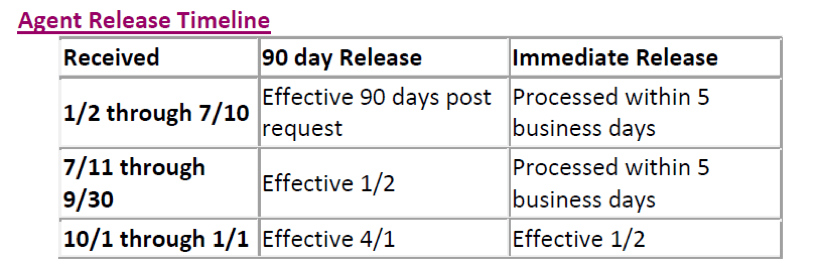
Immediate Release Policy
To receive an immediate release, external agents must secure a release letter from their current upline. It is at their discretion whether or not to release an agent prior to 90 days (see Delayed Release Policy below). The current upline is required to formally communicate the release of the agent in writing using company letterhead, signed by the principal, with a current or future effective date of the release. Complete a Humana Agent to MGA Form via DocuSign and attach a letter of release. A copy will be sent to AgentSupport@humana.com & contracting@appliedga.com. Please see the timeline for processing times.
Delayed Release Policy
In instances where an immediate release is not granted, the agent may request a delayed release. Complete the Humana Agent to MGA Form via DocuSign and a copy will be sent to AgentSupport@humana.com & contracting@appliedga.com. Please see the timeline for processing times.
Log into https://www.humana.com. Click on your name or agency name in the top right, select Profile. Then Edit Profile Information.
Log into https://www.humana.com. Click on Update Direct Deposit under the Commissions section.
View your current non resident appointment on www.humana.com. Navigate to Licensing & Contracts.
Active agents can add a license by sending an email to agencymgt@humana.com. Ask for the state to be loaded on your Humana appointment. Include your SAN number and copy of the license is not needed.
The resident license and all non-resident licenses are pulled from NIPR during the initial contracting and all are loaded upon activation.
Complete the Humana Assignment of Commission form via DocuSign. The completed form will be sent to agencymgt@humana.com and contracting@appliedga.com.
Imperial Health Plan
Thank you for your interest in certifying with Imperial. To conduct enrollment with Medicare beneficiaries into any of the Imperial plans, agents must be certified. To obtain online certification complete your online request – AGA Imperial Contracting Request
Imperial will then send you an agent online contracting and certification link. The email will be from agentportal@imperialhealthplan.com with the subject of “Please confirm your email”. Any general questions can be addressed by calling Imperial’s Agent Support line 800-838-5197.

After you receive your invite, click the link to begin your registration at https://agentportal.imperialhealthplan.com/login. Be prepared to upload your AHIP/FFM certificate, your license, and your E&O coverage.
You will enter your basic information and create a password. Next, select the line(s) of business you are applying for—MAPD, ACA, or both. Then upload your license, E&O, and AHIP/FFM certificate.
Review all information, sign, and submit. Once completed, you will have access to the Imperial Portal, where you can proceed with the MAPD certifications.
Policy: A letter of release is required to transfer an agent if they have written business in the past six months. If no business has been submitted in the past six months then the agent is able to transfer to a new upline.
Start your transfer today by emailing contracting@appliedga.com. Tell us you are currently contracted with another upline, would like to move to AGA, and when you last submitted Imperial business. If you are not sure when your last piece of business was submitted please reach out to Imperial’s Agent Support line 800-838-5197.
Example Email: AGA Contracting, I am currently contracted with Imperial through Jones Agency, but I would like to transfer to AGA. I last wrote business in November of last year. Thank you, Sally Ann
When received we will send Imperial your email and complete a form to transfer you to AGA. The entire transfer process can take from one to three weeks.
To conduct enrollment with Medicare beneficiaries into any of the Imperial plans, agents must be certified in each state.
To obtain online certification email contracting@appliedga.com and agents@imperialhealthplan.com . Include your Name, state, NPN, Upline AGA and email address.
Example: Hi Imperial and AGA, Please contract me with Imperial in CA under AGA. My name is Gerry Joe, NPN 123554, GIjoe@gmail.com. Thank you.
Steve will then send you an agent online contracting and certification link.
InnovAge (PACE)
Thank you for your interest in contracting with InnovAge (PACE). InnovAge is the largest provider of PACE, a program that gives seniors an alternative to nursing facilities. Get started today by creating an account using either direct or AGA Pay.
InnovAge Direct Pay Contracting Link: Agents are paid directly by InnovAge Health.
(Not Common) InnovAge Indirect Pay Contracting Link: AGA pays you for your enrollments
For additional details see InnovAge Broker Handbook
Blackout periods: Each year a release blackout period will start October 1st and will end December 31st for general agent releases
Release Policy: If you are requesting a release from an FMO you must submit your release request in writing to: brokersupport@innovage.com and carbon copy your current FMO, and contracting@appliedga.com. If the FMO agrees to an immediate release, InnovAge will honor this request. In the event the FMO will not release, you will be aligned with the FMO for an additional three months which will not impact your production. The three-month release period will start when InnovAge receives your release request. Upon the three-month expiration date, a new alignment can be approved with the agents request to BSU. The request must include the name of the contracted FMO, or the intent to realign as a direct agent to InnovAge.
Example: Hello InnovAge and Current FMO, Please contract me with InnovAge in under AGA. I am requesting to be released immediately by my current FMO My name is Gerry Joe, NPN 123554, GIjoe@gmail.com. Thank you.
Updates can be made on https://broker.innovage.com/
Email brokersupport@innovage.com to make the change
Agents can email brokersupport@innovage.com to have state licenses added for consideration, or can add the State license via their portal https://broker.innovage.com/
Indiana University Health Plans
IMG
You can immediately begin IMG contracting by using the following contracting link: https://producer.imglobal.com/login/new-producer-contracting.aspx?mga=182158
Innovative Integrated Health Community Plans
Thank you for your interest in marketing IIHCP through Applied General Agency. To get appointed you will first need to certify for IIHCP certification by using IIHCP certification instructions in your AGA back office portal under Sales Tools, My Sales Tools then Certifications.
On the certification training indicate that your upline is Applied General Agency. Sales Agents must pass this test with a score of at least 85% in order to be appointed or re-appointed with Integrated HealthPlan. There are 20 questions and the test is not timed. You may attempt the test up to 5 times in order to achieve the passing score. If you do not pass after 5 attempts, please contact your broker manager.
Then once you have completed your exam, IIHCP Broker Support will be forwarding you DocuSign to complete your contract.
Agents may change sales hierarchies once during a twelve month cycle with written notice to IIHCP brokersupport@iihcplans.com.
Transfers are processed once during a 12-month cycle and only January-September. No hierarchy change is permitted October-December. The last day to submit a hierarchy change is September 15th for an October 1 effective date. All hierarchy requests must be submitted by the 15th of the month for a 1st of the following month effective date. If received after the 15th of the month the request will be processed 2 months out. Example: written request received Jan 1st-15th, the transfer is effective Feb 1st. If written request is received by Jan16th-Feb15th the transfer will become effective March 1st.
IIHCP will send written notification to the current and new agency notifying them of the transfer request.
Email changes to brokersupport@iihcplans.com
Intervalley
Intervalley closed as of Jan. 1st 2023 and they currently have no members. They are no longer listed in Medicare.gov in 2023.
You can immediately begin Intervalley certification by using Intervalley certification instructions in your AGA back office portal under Sales Tools, My Sales Tools then Certifications.
Intervalley currently requires a letter of release to transfer uplines. Please send a copy of your letter of release to contracting@appliedga.com and let us know you need to transfer your Intervalley contracting.
Intervalley: 909-623-6333
Jefferson Health Plans
Thank you for your interest in contracting with Jefferson Health. To get started please complete the request link via DocuSign. AGA is partnered with our Integrity Partner, Ritter, for us to offer Jefferson Health to our agents. After the DocuSign submission, you will receive an invitation to begin contracting in a few days. Click on the link to begin contracting.
Jefferson Health Plans Contracting Request Direct pay
If you plan to assign your commission to a corporation that you do not own, both the corporation and its principal must be fully contracted and certified with this carrier before you can be contracted. Once the corporation and its principal are approved and ready to sell, the principal must email contracting@appliedga.com stating that they would like you to be appointed as an agent under their corporation for this carrier. They must also confirm that they understand they must remain contracted and certified with the carrier in order to continue receiving residual commissions.
To begin your transfer complete the Request link via DocuSign. AGA is partnered with our Integrity Partner, Ritter, for us to offer Jefferson Health to our agents. After the DocuSign submission, you will receive an invitation to begin contracting in a few days. Click on the link to begin contracting.
Jefferson Health Plans Contracting Request Direct pay
If you plan to assign your commission to a corporation that you do not own, both the corporation and its principal must be fully contracted and certified with this carrier before you can be contracted. Once the corporation and its principal are approved and ready to sell, the principal must email contracting@appliedga.com stating that they would like you to be appointed as an agent under their corporation for this carrier. They must also confirm that they understand they must remain contracted and certified with the carrier in order to continue receiving residual commissions.
Updates can be made on the carrier portal, or requests can be sent to license@ritterim.com
Complete EFT Change Form Via Docusign
To add a state, please complete Jefferson Health Plans Contracting Request via DocuSign
Johns Hopkins
Thank you for your interest in contracting with Johns Hopkins. To get started complete the contracting link via DocuSign. AGA is partnered with our Integrity Partner, Ritter, for us to offer Johns Hopkins to our agents. Be prepared to upload a copy of a void check. After the DocuSign submission, you will receive a contracting link to begin contracting in a few days. Click on the link to begin contracting.
Johns Hopkins Direct Pay Contracting Link
ONBORDING: Ritter will send the agent the certification link to complete along with the Miramar user guide. This will come from license@ritterim.com from the contracting specialist assigned to process the contract. Once the certifications are completed it will be flipped to appointed.
If you plan to assign your commission to a corporation that you do not own, both the corporation and its principal must be fully contracted and certified with this carrier before you can be contracted. Once the corporation and its principal are approved and ready to sell, the principal must email contracting@appliedga.com stating that they would like you to be appointed as an agent under their corporation for this carrier. They must also confirm that they understand they must remain contracted and certified with the carrier in order to continue receiving residual commissions.
To begin your transfer complete the Request link via DocuSign. AGA is partnered with our Integrity Partner, Ritter, for us to offer Johns Hopkins to our agents. After the DocuSign submission, you will receive an invitation to begin contracting in a few days. Click on the link to begin contracting.
Johns Hopkins Direct Pay Contracting Link
To begin an immediate release you will need a letter of release from your current upline. Complete the Johns Hopkins Direct Pay Contracting Link, Ritter will send you a Miramar code for Johns Hopkins. You will then log into Miramar to initiate a group change request. From the Miramar dashboard, the agent will go to Groups and Change Group, and here you will upload a copy your letter of release from your current FMO. The transfer will take place at the beginning of the following month once the carrier receives the release.
The carrier does have a notice of intent to transfer option but reviewed on a case-by-case basis. The you must complete the Johns Hopkins Direct Pay Contracting Link then submit an email to salesoperations@jhhp.org; ENoble@jhhp.org; license@ritterim.com; contracting@appliedga.com stating your name, NPN, who you are currently under, who you are transferring to (Ritter/AGA), and a detailed explanation of why you are making this change. Upon approval the notice of intent has a 90-day waiting period for transfer. Ex. Hello my name is Toby Stark, NPN 123456, I would like to initiate a 90 day release from FMO Agency. I would like to move my appointment to Ritter/AGA, so that I can get additional support.
If you plan to assign your commission to a corporation that you do not own, both the corporation and its principal must be fully contracted and certified with this carrier before you can be contracted. Once the corporation and its principal are approved and ready to sell, the principal must email contracting@appliedga.com stating that they would like you to be appointed as an agent under their corporation for this carrier. They must also confirm that they understand they must remain contracted and certified with the carrier in order to continue receiving residual commissions.
Updates can be made on the carrier portal, or requests can be sent to license@ritterim.com
Complete EFT Change Form Via Docusign
If you plan to assign your commission to a corporation that you do not own, both the corporation and its principal must be fully contracted and certified with this carrier before you can be contracted. Once the corporation and its principal are approved and ready to sell, the principal must email contracting@appliedga.com stating that they would like you to be appointed as an agent under their corporation for this carrier. They must also confirm that they understand they must remain contracted and certified with the carrier in order to continue receiving residual commissions.
Kaiser Permanente
Thank you for your interest in contracting with Kaiser Permanente. Complete the below DocuSign in according to the state you are going to contract in.
Kaiser Contracting VA, MD, and DC
WA Note: Kaiser has requested that all recruiting for new agents in Washington stop immediately. Kaiser’s goal for Washington at this time is to transition existing brokers only and not grow in Washington. They are uncertain of 2027 growth at this time and are only focusing on the transition of all existing agents to the National platforms.
After your DocuSign is completed in a few days Kaiser will be notified of your contracting request. Kaiser verifies agents. If no issues, Kaiser will upload the information to the EvolveNXT platform. Once uploaded, an email will be sent to the agent from EvolveNXT (donotreply@evolvenxt.com) with instructions to register with EvolveNXT to complete their product certifications. Only AHIP is being accepted. Kaiser Product Training covers all state appointment requests.
Once an agent has completed the KP Product training and verified their AHIP information on EvolveNXT, Kaiser will update their RTS report to indicate that only the In-Person training needs to be completed. Kaiser distributes their RTS reports to their regional managers who will then reach out with the In-Person training link(s) directly to the agent’s email address they provided to Integrity. The webinar link is sent from Kaiser’s National Medicare Broker Support email, NATLMedicareBrokerSupport@kp.org.
In-Person Training Notes:
- In-Person training does not need to be taken annually and only needs to be completed by an agent once.
- Each state/region has its own training link:
- CO Region
- NW Region (OR and SW WA)
- GA Region
- Mid-Atlantic Region (VA, MD, DC)
- HI Region
- Webinar link(s) will be sent out once a week until it has been completed.
- Agents can email the respective Regional Broker Support teams to have the link(s) resent.
- Regional managers can verify how long it takes an agent to complete the In-Person training. If an agent completes it too quickly, the agent is not considered complete and will need to attend the training again.
FMO to AGA/Integrity:
The agent(s) will need to be terminated from their current FMO’s hierarchy and is responsible for working with their current FMO to ensure the termination is completed. There is no delayed release process for Kaiser. Kaiser does not get involved in transfers/hierarchy changes. From the carrier’s perspective, all business belongs to the contracted FMO. Any business written by the agents does not follow the agents and will remain with the previous FMO.
*All FMO’s use the same spreadsheet onboarding process that Integrity uses as this is Kaiser’s appointment process/management system for agents.
Once the agent(s) receives verification from their previous FMO, the agent(s) will need to communicate with contracting@appliedga.com that the termination has been completed so that AGA can submit the agent’s information back to Kaiser to realign the appointment.
Integrity Partner to Integrity Partner:
Agent(s) will need to wait 6 months in their current Integrity Partner’s hierarchy or obtain a signed release from their current Partner on their company letterhead.
If a release is obtained, the release will need to be submitted to the Integrity Contracting team for processing. Release will be added to the agent’s profile and the hierarchy will be updated internally. Nothing will be submitted to the carrier as all Integrity hierarchy is tracked internally only.
Direct to AGA/Integrity
If you are contracted directly with Kaiser you will need to reach out to Kaiser to request a termination/release to realign under Integrity/AGA. Once that has been completed please notify contracting@appliedga.com, and we will begin your onboarding.
Please email changes to contracting@appliedga.com.
To update your commissions for CO, OR, GA or WA complete the EFT Form via DocuSign
To update your commissions for VA, MD and DC complete the Kaiser Contracting VA, MD and DC via DocuSign
To add a state complete the corresponding Kaiser DocuSign.
KelseyCare
Thank you for your interest in marketing KelseyCare through Applied General Agency. KelseyCare uses an online contracting system and we will need some information to get the process started.
To get started log into your AGA portal and obtain a 5.6 Carrier Request Form and send it to contracting@appliedga.com. You will find this form in your AGA portal under Sales Tools, My Sales Tools, Forms Library, then “5.6 Contracting Forms”. After you return the 5.6 Add Carrier Request you will receive a email from kcabrokersupport@kelseycareadvantage.com to begin your contracting and certifications.
- Website https://kelseyportal.kelseycareadvantage.com/
- Username is your email
If you cannot find your KelseyCare email, navigate to the KelseyCare website and reset your password.
Please see KelseyCare Agent Onboarding Guide
To begin your Kelsey Care transfer by sending an email with all the following information:
- Send an email to kcabrokersupport@kelseycareadvantage.com; contracting@appliedga.com, and your current upline
- In the body of the email request a release from current FMO. Example Hello, my name is Toby Stark I would like to request a release for Kelsey Care to move to AGA.
- Attach the KelseyCare Hierarchy Change Form and a copy of your release letter from your current upline if you have it.
An agent / agency may not change hierarchies more than once in any 12-month period.
Releases or hierarchy changes will not be processed or honored between September 1 and December 31 (blackout dates). Any requests received during this time will be held for processing until January.
The agent must be in Good Standing with KCA to be eligible for a hierarchy change.
The KCA Hierarchy Change Rules are subject to change at any time. It is the responsibility of the agent / agency to check KelseyPortal for any updates to the KCA Hierarchy Change Rules and Hierarchy Change Form. This you will need to toggle from Applications to the Configuration module, then select ALL for all four categories, you’ll find it as #130. Hierarchy change – Rules & Form
Email changes to kcabrokersupport@kelseycareadvantage.com
Upon agent’s first enrollment, they need to contact commissions@kelseycareadvantage.com to request a link to register for direct deposit with KelseyCare’s vendor “Paycor”. KelseyCare will also reach out to the agent if they are not registered and are owed commissions.
Agent commission is paid directly by the carrier to either yourself or a corporation you own. If you would like to assign your commission to a corpoation you do not own you will need to contract as an LOA under AGA. Please contact contracting@appliedga.com to be set up as an LOA with KelseyCare. KelseyCare will pay AGA, and AGA will distribute your commission.
LA Care
Thank you for your interest in marketing LA Care through Applied General Agency. LA Care uses an online contracting system, and will require you to complete your own contracting. To get started please create an agent portal and request contracting.
See LA Care portal and onboarding training guide. Please have your license, E&O and AHIP ready to upload. You must reside in CA to offer LA Care.
LA Care Broker Link http://www.lacare.org/agent-central
Apply Now, select LA Care Medicare Plus, Select AGA, complete the basic information and submit. Once completed AGA will review your submission, then you will receive your training link

Per LA Care, agents are only allowed to transfer once a year between January and August. If you submit a request to transfer any time after September 1st, the request will be declined. You will need to resubmit the request in January.
LA Care request transfer by logging into Sales Force, submit a request and upload your release. LA Care transfer process
https://health-care.my.site.com/Login
Transfer*
Agent submits transfer request with L.A. Care Health Plan to existing General Agency (Transfer should be processed by General Agency within 48 hours. If transfer request is not processed within 48 hours, L.A. Care Admin will follow-up with General Agency. L.A. Care Admin may escalate transfer requests if General Agency does not respond)
L.A. Care admin will approve transfer requests within 10 business days.
When transfer is complete, L.A. Care will notify agent via email.
Commission (with book of business transfer)
If transfer is approved by L.A. Care before the 5th of the month (Commission change will reflect change on the following month.)
If transfer is approved by L.A. Care after the 5th of the month (Commission change will reflect change 2 months from the transfer complete date.)
*Please note that transfers are not permissible between September-December, on a yearly basis.
Liberty Medicare Advantage
Thank you for your interest in contracting to represent Liberty Medicare Advantage plans through AGA. You will be completing contracting through Liberty’s online contracting system Liberty Broker Portal.
To get started log into your AGA portal and obtain a 5.6 Carrier Request Form and send it to contracting@appliedga.com. You will find this form in your AGA portal under Sales Tools, My Sales Tools, Forms Library, then “5.6 Contracting Forms”.
After you return the 5.6 Add Carrier Request you will receive an invitation with a link from donotreply@evolvenxt.com and “Evolve Agent Contracting Registration” as the subject line. The email will include the contracting link, username, and password. Click on the link to begin contracting. The contracting link will always be https://lma.evolvenxt.com/login.htm, and your username is your email.
Updates can be made on https://lma.evolvenxt.com/login.htm. Your email is your username.
Updates can be made on https://lma.evolvenxt.com/login.htm. Your email is your username.
Liberty Bankers
Thank you for your interest in contracting with Liberty Bankers through AGA. Please have your void check ready to upload. When completed your contracting will be sent to Liberty Bankers by AGA, and then you set instructions to complete your certifications. Please contact contracting@appliedga.com with questions.
To get started complete the DocuSign Liberty Bankers Contract.
Thank you for your interest in contracting with Liberty Bankers through AGA. To complete your transfer please complete a new contract. Please have your void check ready to upload. When completed your contracting will be sent to Liberty Bankers by AGA, and then you set instructions to complete your certifications. Please contact contracting@appliedga.com with questions.
To get started complete the DocuSign Liberty Bankers Contract.
Updates can be made by contacting contracting@LBIG.com
Updates can be made by contacting contracting@LBIG.com
Agents changing their Liberty Bankers assignment of commissions will need new contracting paperwork. Please complete a new Liberty Bankers Contract.
An agent contracting their corporation must be licensed both as an individual and as a corporation in the following states to be eligible to sell in those states: FL, GA, MA, MT, SD, VA, WV, WI.
All NON RES states for an agent are added as an agent writes so all the appointment fees don’t hit his account at one time. Liberty Bankers only pays for resident appointments. However, Liberty Bankers will need an email from you if an agent is about to write in his NON RES state of PA or NM. Email contracting@libertybankerslife.com to add PA or NM. These are PRE APPT states and the agent cannot write an application until he’s appointed. If he writes an app and then sends an email, he will have to rewrite the app.
ManhattanLife
Thank you for your interest in marketing Manhattan Life through Applied General Agency. Manhattan Lifeuses an online contracting system, and you will be contracting and certifying in one sitting.
How to Access the Agent Portal. Create an account using either direct or AGA Pay.
Manhattan Life Direct Pay Contracting Link: Agents are paid directly by the carrier.
(Not Common) Manhattan Life Indirect Pay Contracting Link: AGA pays you for your enrollments
To begin your Manhattan Life transfer email contracting@appliedga.com, and notify us you are transferring your Manhattan Life. AGA will generate a contracting link for you to complete. A release is needed if you have written business in the past 6 months.
Email MarketingMail@ManhattanLife.com and indicate what the changes are. Include your name, NPN and indicate the carrier(s) you are making the change for.
Email MarketingMail@ManhattanLife.com and indicate what the changes are. Include your name, NPN and indicate the carrier(s) you are making the change for.
Email requestes to MarketingMail@ManhattanLife.com. Most states are “Just in Time” and will be added as agents submit business.
Mass Advantage – UMASS
To get started please request the carrier by completing our Request Form then we will email you the contracting instructions.
Transfer/Release Policy
To transfer you will need to obtain a letter of release from your previous upline and send a new conract.
Medica
Thank you for your interest in contracting with Medica . AGA is partnered with our Integrity Partner, Plan Advisors, for us to offer this carrier to our agents. To get started log into your AGA portal and obtain a 5.6 Carrier Request Form and send it to contracting@appliedga.com. You will find this form in your AGA portal under Sales Tools, My Sales Tools, Forms Library, then “5.6 Contracting Forms”.
After a few days, you will be sent a contracting link from contracting@ifcnationalmarketing.com ContractNow to complete your contracting.
A letter of release is required to transfer your appointment. Please send a copy of your release to contracting@appliedga.com and info@myplanadvisors.com. Releases are needed in the broker has a book of business and they intend to keep that book. Transferring agents cannot use ContractNow, so manual contracting through.pdf packets are required.
Medica will require a release from the current upline for an agent to move from one agency to another. The agent needs to request the release from current FMO once received send to AGA/Plan Advisors
If business isn’t moving with the agent – the carrier may be able to move it without a release, the business will just need to be reassigned by the current upline. The agent’s current upline will need to coordinate the business transfer directly with Medica.
If the agent is not under an agency but has their own agency – they may can change FMOs in April or May without a release. Outside of those months – a release is required for all situations and the carrier needs to review for approval.
Updates can be made by contacting brokeroperations@medica.com
Updates can be made by emailing a voided check or bank letter to brokeroperations@medica.com
Updates can be made by emailing a license copy to brokeroperations@medica.com
Medica ACA
Thank you for your interest in contracting with Medica . AGA is partnered with our Integrity Partner, Plan Advisors, for us to offer this carrier to our agents. To get started log into your AGA portal and obtain a 5.6 Carrier Request Form and send it to contracting@appliedga.com. You will find this form in your AGA portal under Sales Tools, My Sales Tools, Forms Library, then “5.6 Contracting Forms”.
After a few days, you will be sent a contracting link from ContractNow to complete your contracting.
A letter of release is required to transfer your appointment. Please send a copy of your release to contracting@appliedga.com and info@myplanadvisors.com. Releases are needed in the broker has a book of business and they intend to keep that book. Transferring agents cannot use ContractNow, so manual contracting through.pdf packets are required.
Medica will require a release from the current upline for an agent to move from one agency to another. The agent needs to request the release from current FMO once received send to AGA/Plan Advisors
If business isn’t moving with the agent – the carrier may be able to move it without a release, the business will just need to be reassigned by the current upline. The agent’s current upline will need to coordinate the business transfer directly with Medica.
If the agent is not under an agency but has their own agency – they may can change FMOs in April or May without a release. Outside of those months – a release is required for all situations and the carrier needs to review for approval.
Updates can be made by contacting brokeroperations@medica.com
Updates can be made by emailing a voided check or bank letter to brokeroperations@medica.com
Updates can be made by emailing a license copy to brokeroperations@medica.com
Medico
Contracting
Thank you for your interest in contracting with Medico (Wellabe). Please complete your contracting by selecting the correct DocuSign contracting link.
Medico Contract – Direct Pay
(Not Common) Medico Indirect Pay – AGA pays
Important: Enter your full name as it appears on your license after clicking the contracting link.

Transfer/Release Policy
To begin a transfer complete a Medico Contract via DocuSign. This contract will place you directly under AGA and pay your commissions directly to you or a corporation you own.
A letter of release is needed if you have written business in the last 6 months under your current hierarchy.
EFT Changes
Begin your EFT Change with Medico emailing healthagent@wellabe.com the Wellabe Direct Deposit Form – MI9F 4320-DD-11012016. Please complete the Direct Deposit form in its entirety with the Assignee’s Bank information where commissions are to be deposited. (Electronic payment is our only option available.)
Add State
Add state for Medico can be requested by emailing healthagent@wellabe.com with the agent’s name and NPN for review.
Assignment of Commissions
The purpose of an Assignment is to legally assign an Agent’s/Agency’s commissions to another Agent/Agency. This is done when an Agent/Agency sells or buys a book of business or for other reasons. Please review the checklist carefully. We cannot proceed with this Assignment until all paperwork is received in good order. Send all forms to Email: healthagent@wellabe.com
- The Assignor is the Agent/Agency assigning their commissions to another Person/Entity. (If Agency is involved, contracted agency name should be inserted in top section of Form. Signature of Agency principle is at bottom.)
- The Assignee is the Person/Entity to receive the commissions from the Assignor. (If Entity is involved, Entity name should appear on top section of Form. Signature of principle is at bottom.)
W-9 – Assignee complete
- Please fill out the W-9 form in its entirety with the Assignee’s Tax information.
- Please verify that the Tax ID number matches the Assignee’s Tax ID Number on the Assignment of Distributor’s Agreement Form.
- If the numbers do not match, we cannot process the Assignment
Wellabe Direct Deposit Form – MI9F 4320-DD-11012016 – Assignee complete
- Please complete the Direct Deposit form in its entirety with the Assignee’s Bank information where commissions are to be deposited. (Electronic payment is our only option available.)
Memorial Hermann
Thank you for your interest in contracting with Memorial Hermann. AGA is partnered with our Integrity Partner, Trusted Senior Specialists, for us to offer this carrier to our agents. To get started, please complete the Memorial Hermann Contract via DocuSign. Have your TX license, E&O and AHIP ready for upload. Your contract will be sent to AGA and TSS immediately after submission for processing. Once processed Memorial Hermann will send a contracting invite to you via email. Be on the look out for an email from noreply@medadv360.com.
Transfer/Release Policy
Thank you for your interest in contracting with Memorial Hermann. AGA is partnered with our Integrity Partner, Trusted Senior Specialists, for us to offer this carrier to our agents. To get started, please complete the Memorial Hermann Contract via DocuSign and upload your release on the DocuSign. Have your TX license, E&O and AHIP ready for upload. Your contract will be sent to AGA and TSS immediately after submission for processing. Once processed Memorial Hermann will send a contracting invite to you via email.
Demographic Changes
Changes can be made by phone or email at (713) 338-6556 or broker-appointments@memorialhermann.org.
EFT Changes
Changes can be made by emailing MH EFT Form to broker-appointments@memorialhermann.org.
AOC Changes
Agent commission is paid directly by the carrier to either yourself or a corporation you own. If you would like your commission to be paid to a corporation you do not own or to another individual please complete the Memorial Herman AOC form. You will need to assign your commissions to Trusted Senior Specialists, and TSS will pay AGA and AGA will distribute your commissions.
MetroPlusHealth Plan
Thank you for your interest in contracting with MetroPlus Health Plan. To get started please complete the MetroPlusHealth contract via DocuSign. Your contract will be sent to AGA and MetroPlus Health immediately after submission for processing. Please be prepared to upload a copy of your license and your AHIP or FFM Certification.
MetroPlus Health Carrier Contract
Once you complete the MetroPlus Health Carrier Contract, MetroPlus will complete a background check and begin documenting your information in our systems. This process typically takes 2-3 business days. Then you will be sent your certifications. Please search your inbox for an email from noreply@bigtincan.com. This email contains important instructions on how to reset your password and access the new training hub. Your username is your personal email address. To log into the training hub, visit: https://metroplushealth.app.bigtincan.com/. If you have any questions or if you did not receive the email from noreply@bigtincan.com, please contact our Training Support Team at traininganddevelopment@metroplus.org and cc Broker Manager Mike Jimenez at jimenmi@metroplus.org
Once you have completed the contracting and the training, you will be appointed with the New York State Department of Financial Services and fully enrolled in our systems. This process typically takes 3–4 business days. You will then receive an appointment letter confirming your ability to sell with MetroPlusHealth, including your writing number. Thank you for your interest in MetroPlusHealth, once again. If you have any questions, please contact MPHBrokers@metroplus.org.
Transfer/Release Policy
To begin your transfer please complete the MetroPlus Health Carrier Contract via DocuSign
Demographic Changes
Email changes to MPHBrokers@metroplus.org.
Molina
Thank you for your interest in contracting to represent Molina through AGA. You will be completing contracting through Molina’s online contracting system.
To get started log into your AGA portal and obtain a 5.6 Carrier Request Form and send it to contracting@appliedga.com. You will find this form in your AGA portal under Sales Tools, My Sales Tools, Forms Library, then “5.6 Contracting Forms”.
After you return the 5.6 Add Carrier Request you will receive an invitation with a link from donotreply@evolvenxt.com and “Evolve Agent Contracting Registration” as the subject line. The email will include the contracting link, username, and password. Click on the link to begin contracting.
If you cannot access your emailed invitation, you can access your contract by logging into https://molina.evolvenxt.com/, your username will be your email address and you may reset your password.
See Molina Producer Guide – This guide contains step-by-step instructions, supplemental resources and tools, and important policies and procedures, which supplement the Agreement you executed with Molina Healthcare. The Medicare Producer Guide is incorporated by reference to your Agreement.
Transfer/Release Policy
To transfer your Molina appointment to AGA, log in at https://molina.evolvenxt.com/. Your username will be your email address, and you may reset your password if needed. For detailed instructions, refer to the Molina Transfer Guide.
In the My Account section, under My Hierarchy Info and then Account Info, you will see one level of hierarchy between the agency and the agent. From this page, brokers can submit requests to update their hierarchy and/or assigned Sub Types by clicking Change. Select the appropriate option under Hierarchy Change Options, then choose a New Sub Type Option and click Search. Search again to generate a list of available Upline Names and NPNs.
For MAPD, select Applied General Agency – NPN 6187022.
Hierarchy change requests may take up to 90 days to process. If both your current hierarchy and new hierarchy approve the request, the change will be executed on the next business day following approval.
Note that there is a blackout period from 10/1 to 1/31; if your execution date falls within this period, the change will instead execute on 2/1, the day after the blackout ends.
Demographic Changes
Email your updated information to MCRBrokerContracting@MolinaHealthcare.com and contracting@appliedga.com, include your name and NPN.
EFT Changes
To make changes to your EFT or assign commissions to a corporation you own, send an email request to Molina’s commissions team at mcrcommissioninquiry@molinahealthcare.com. Include your information name, NPN, email and corporation’s name, corporation NPN, as necessary. Molina will send you a COUPA link to make the change to your commission. COUPA Guide
For questions, please call us at 1-866-440-9788 or email us at MCRCommissionInquiry@molinahealthcare.com
Add Non Resident State
To add state(s) with Molina: Log in to your Molina Agent Portal> Navigate to My Credentials > Under Sales States and Licenses, select “Manage My Licenses” > Choose the state(s) you would like to add > click Add Selected States.
Molina Appointment Requirements
Pre-Appointed States
Agents must be appointed with Molina before writing business in Kentucky (KY), New York (NY), Ohio (OH), Utah (UT), Washington (WA), and Wisconsin (WI).
Just-in-Time (JIT) Appointment States
Molina will process the appointment when the agent submits their first application in Connecticut (CT), Iowa (IA), Idaho (ID), Michigan (MI), Mississippi (MS), Nebraska (NE), New Mexico (NM), Nevada (NV), South Carolina (SC), and Texas (TX).
Silent Appointment States
These states do not require a Molina appointment. As long as the agent maintains an active license in the state, they may write business in Arizona (AZ), California (CA), Illinois (IL), and Massachusetts (MA).
Important Notes
Agents are responsible for ensuring their resident and non-resident licenses remain active and in good standing. Requests to add states should only be submitted for states in which the agent holds an active license. Molina appointment processing timelines may vary for Pre-Appointed states.
Assignment of Commissions
To make changes to your EFT or assign commissions to a corporation you own, send an email request to Molina’s commissions team at mcrcommissioninquiry@molinahealthcare.com. Include your information name, NPN, email and corporation’s name, corporation NPN, as necessary. Molina will send you a COUPA link to make the change to your commission. COUPA Guide
For questions, please call us at 1-866-440-9788 or email us at MCRCommissionInquiry@molinahealthcare.com
Molina ACA
Molina ACA is on an onboarding freeze until 2027.
Thank you for your interest in contracting with Molina ACA . AGA is partnered with our Integrity Partner, Plan Adviors, for us to offer this carrier to our agents. To get started log into your AGA portal and obtain a 5.6 Carrier Request Form and send it to contracting@appliedga.com. You will find this form in your AGA portal under Sales Tools, My Sales Tools, Forms Library, then “5.6 Contracting Forms”.
After a few days, you will be sent a contracting link to complete your ACA contracting.
Transfer/Release Policy
To transfer your Molina appointment to AGA, log in at https://molina.evolvenxt.com/. Your username will be your email address, and you may reset your password if needed. For detailed instructions, refer to the Molina Transfer Guide.
In the My Account section, under My Hierarchy Info and then Account Info, you will see one level of hierarchy between the agency and the agent. From this page, brokers can submit requests to update their hierarchy and/or assigned Sub Types by clicking Change. Select the appropriate option under Hierarchy Change Options, then choose a New Sub Type Option and click Search. Search again to generate a list of available Upline Names and NPNs.
For ACA, select Plan Advisors – NPN 17235707.
For Marketplace requests, the execution date will be the first of the following month. If your current hierarchy denies the request, the change will automatically take effect on the 91st day as a constructive release.
Note that there is a blackout period from 10/1 to 1/31; if your execution date falls within this period, the change will instead execute on 2/1, the day after the blackout ends.
Demographic Changes
Email changes to contracting@appliedga.com and info@myplanadvisors.com and inform us which ACA carriers need to be updated with the new information.
EFT Changes
Add Non Resident State
Molina ACA does Just in Time appointments
Mutual of Omaha
Thank you for your interest in contracting with Mutual of Omaha.
To get started selling Mutual of Omaha complete the Mutual of Omaha via DocuSign. Your contract will be sent to AGA and Mutual of Omaha immediately after submission for processing.
We recommend starting with Med Supp appointment. Agents have 18 months to submit one piece of business. If no business is submitted the MOO appointment will be terminated and a new contract will need to be submitted.
*Life Appointments: Agents selling LTC in states that have implemented LTC Partnership or product training programs must complete their state’s initial training requirement before soliciting and submitting any LTC policies and must provide proof of training prior to the application issuing. Please refer to the LTC Partnership Programs on Sales Professional Access under the LTC Product link for information regarding the LTC Partnership states and the training requirements.
**Annuity Products. Copies of continuing education and Company-specific certificates are required for producers soliciting annuities in specific states. For more information on the regulation and training, please refer to the NAIC Annuity Suitability link in SPA, then click on the Compliance link under the Product tab. Federal regulations dictate that Anti-Money Laundering training is required for producers soliciting permanent life insurance or annuities. For more information on the regulation and training, please refer to the Anti-Money Laundering link in SPA, then click on the Compliance link under the Product tab.
Transfer/Release Policy
If an agent wrote business within the past 6 months or has contracted with current upline within the past 6 months please complete a MOO Transfer Form and complete a MOO AGA DocuSign Contract.
Demographic Changes
Agents can change their information is through the producer website https://www.mutualofomaha.com/sales_professionals/
EFT Changes
Agents can change their direct deposit information is through the producer website https://www.mutualofomaha.com/sales_professionals/
Once logged in, the agent needs to click on the person in the upper right-hand corner, select Direct Deposit, then click the Update button.

Add Non Resident State
View your current appointments through the producer website https://www.mutualofomaha.com/sales_professionals/
Email add state requests with a copy of your non resident license to contracting@appliedga.com and CONTRACTSANDAPPOINTMENTS@MUTUALOFOMAHA.COM. Include your name, carrier ID and NPN.
Appointment Requirements
Pre-appointment States (Pennsylvania, Montana): A party must have an effective appointment prior to solicitation. If applications are dated prior to the appointment effective date with Mutual of Omaha these applications will be rejected, and a letter will be mailed to the client. A party must have an effective appointment prior to solicitation. If applications are dated prior to the appointment effective date with OHIC, the application will be processed, and the producer will not be paid commission.
Non-Pre-appointment States: A party may solicit prior to having an effective appointment (applications may be submitted with contracting paperwork). However, the policy cannot be issued until the appointment is effective with Mutual of Omaha, or OHIC. Insurance department regulations DO require us to have producers appointed within a certain period of time after receiving applications (typically 10-15 days).
myPlace Health (PACE)
Thank you for your interest in contracting with MyPlace Health. To get started please complete the request link via DocuSign.
1. MyPlace Health Contracting Request
2. Agents take THIS exam and score 80% or above.
3. Fill out THIS payee form
Transfer/Release Policy
Begin your MyPlace Health transfer to AGA by emailing sviana@myplacehealth.com & brokers@myplacehealth.com and state you are transferring your appointment to Applied General Agency. Ex “Hello my name is Jack Stark, please transfer my MyPlace Health appointment to Applied General Agency.”
Demographic Changes
Email changes to brokers@myplacehealth.com
EFT Changes
Email changes to brokers@myplacehealth.com
Add Non Resident State
Carrier in CA only